10 vidIQ alternatives compared (2026): free and paid
10 vidIQ alternatives compared on price, free plans and features, from Vid0 and TubeBuddy to 1of10, ViewStats and OutlierKit, with October 2026 prices.

13 min read
vidIQ is the default YouTube growth tool for a lot of creators, and it's a good one. But it isn't the right fit for everyone. Maybe the AI credits run out mid-month, maybe you only need one or two of its 30-plus tools, or maybe you want numbers that are built around a channel your size.
This list compares the 10 best vidIQ alternatives we could find, on price, free plans and the job each one does best.
We make Vid0, so treat its top spot as our view: we say why it's there and where the other tools beat it. Every tool here is live, has a public pricing or product page and covers a job creators use vidIQ for. Every price comes from that company's own page, checked in October 2026.
If you only want Vid0 and vidIQ side by side, see our page on Vid0 as a vidIQ alternative for small channels.
Prices change often. Treat every figure as "as of October 2026" and confirm on the linked page before you pay.
Why do creators look for a vidIQ alternative?
From vidIQ's own pricing page as of October 2026, these are the usual reasons:
- Price. Boost is $19/month ($199/year) and Max is $49/month ($468/year), in US list prices. The page notes local prices may differ.
- AI credits. Free includes 150 AI credits a month; Boost includes 2,000 and Max 6,000 by default. If you lean on the AI tools, you can run out.
- One channel per plan. Boost and Max are priced per channel. vidIQ's FAQ points teams with more than three channels to Enterprise.
- Focus. vidIQ does a bit of everything. If your weekly job is finding ideas, testing thumbnails or tracking stats, a focused tool can do that one job better or cheaper.
How did we pick these vidIQ alternatives?
We only included tools that are live, have a public pricing or product page, and cover at least one of the jobs creators use vidIQ for:
- Ideas: which videos and topics are working in your niche right now.
- Keywords: which searches you can realistically rank for.
- Packaging: titles, thumbnails and descriptions.
- Workflow: editing many videos at once, or a Chrome extension that works on YouTube.
- Tracking: how your channel and your competitors grow.
Then we ranked them by how well they replace vidIQ for a small or mid-size channel, not by how big the company is.
How do these vidIQ alternatives compare?
Here's what each one is best for, whether you can start free and where paid plans begin, as of October 2026:
| Tool | Best for | Free option | Paid plans start at (October 2026) |
|---|---|---|---|
| Vid0 | Outliers, winnable keywords and brand deals for small channels | Yes, free forever | Creator at $12/month or $99/year |
| TubeBuddy | A/B tests and bulk edits on a budget | Yes, a free plan | Pro at $3/month or $32/year |
| 1of10 | Outlier research and AI thumbnails | Yes, 60 credits a month | Basic at $19/month, or $180/year |
| OutlierKit | Niche, keyword and competitor research | A 30-credit trial, no card | Hobby at $299/year |
| ViewStats | Video and channel analytics | Yes, a free account | Pro, priced in your currency |
| TubeLab | Niche finding and outliers for new channels | Not listed | Starter, price shown at checkout |
| Morningfame | Simple analytics for small channels | First month free (invite only) | Basic at $4.90/month |
| Social Blade | Public stats history for any channel | Yes, when logged in | Bronze at $59.99/year |
| Keyword Tool | YouTube search volume estimates | No (30-day money-back) | Starter at $88/month, or $68/month yearly |
| YouTube Studio | Built-in ideas from your own audience | Yes, free | Free |
Scroll sideways to see every column.
Which vidIQ alternative is best for video ideas?
For video ideas, use a tool built around outliers: videos in your niche that beat their own channel's usual views. They're ideas with evidence, because they show a topic working with an audience. Four tools on this list do that, as of October 2026:
| Tool | How it finds ideas | Free to try |
|---|---|---|
| Vid0 | Outlier scores at the same age across the channels you track, plus daily ideas built from them | Free forever, with 3 tracked competitors |
| 1of10 | An Outlier Finder for videos beating their channel's average, plus title and idea generators | 60 credits a month; outlier search shows 5 results |
| OutlierKit | Outliers on one channel or across a whole field | A 30-credit trial, no card |
| ViewStats | Outliers, alongside its analytics | A free account; Outliers is on Pro |
Scroll sideways to see every column.
For a small or mid-size channel we'd start with Vid0, because it judges every video against its own channel at the same age, then checks whether the keyword behind an idea is winnable at your size. Add 1of10 if you also want AI thumbnails, or use TubeLab to pick a niche first. You can try the method free on any channel with our YouTube outlier finder, no sign-up.
1. Vid0: best for outliers and winnable keywords on a small channel
Vid0 is our tool, so weigh this section with that in mind. We built it for the creator vidIQ's averages don't fit: a channel with a few hundred to a few hundred thousand subscribers, trying to work out what to make next. Here's why we built Vid0.
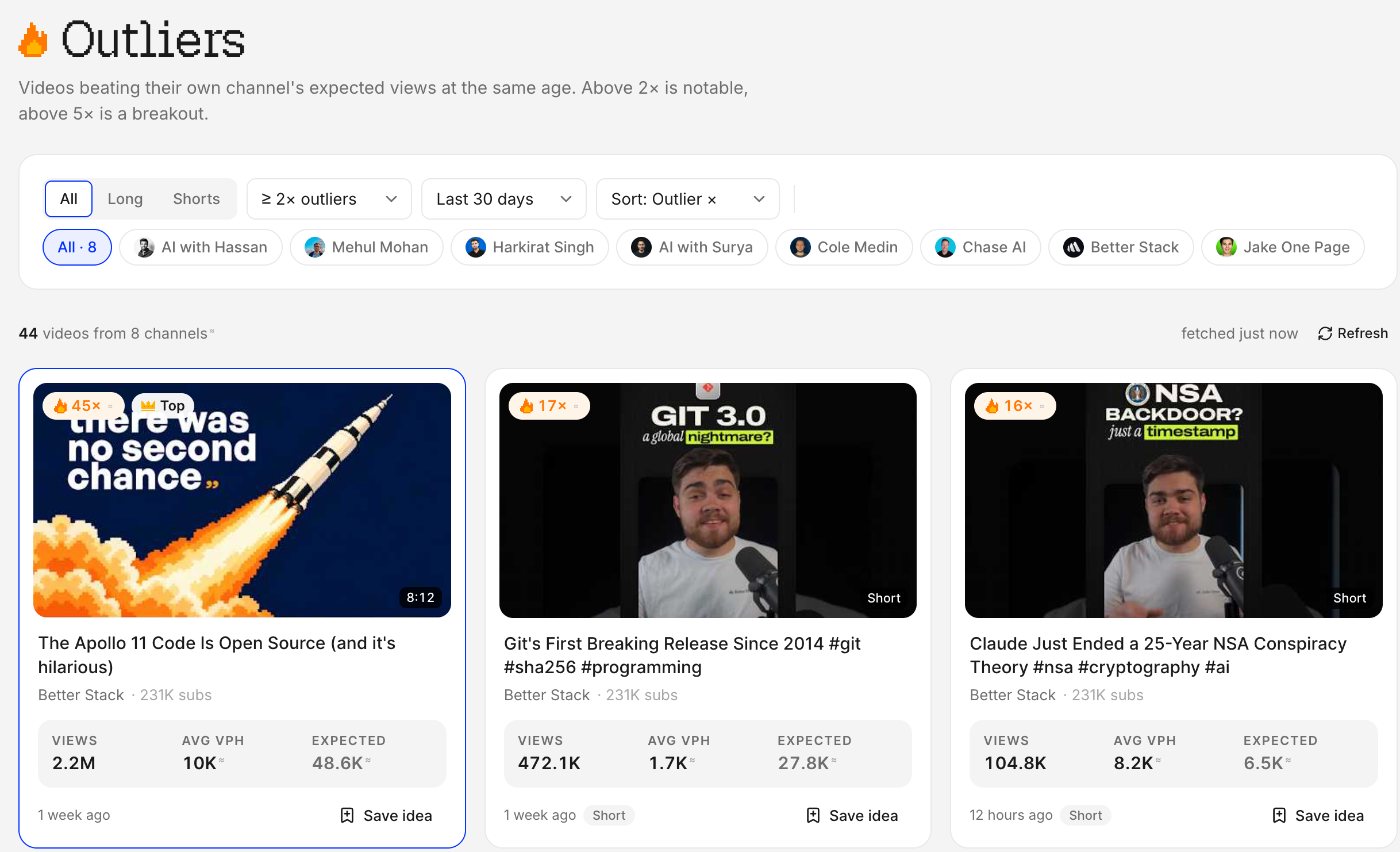
What it does:
- Outlier scores at the same age. Every video is compared with its own channel's typical views for a video that old, so a three-day-old video and a three-year-old video are judged fairly.
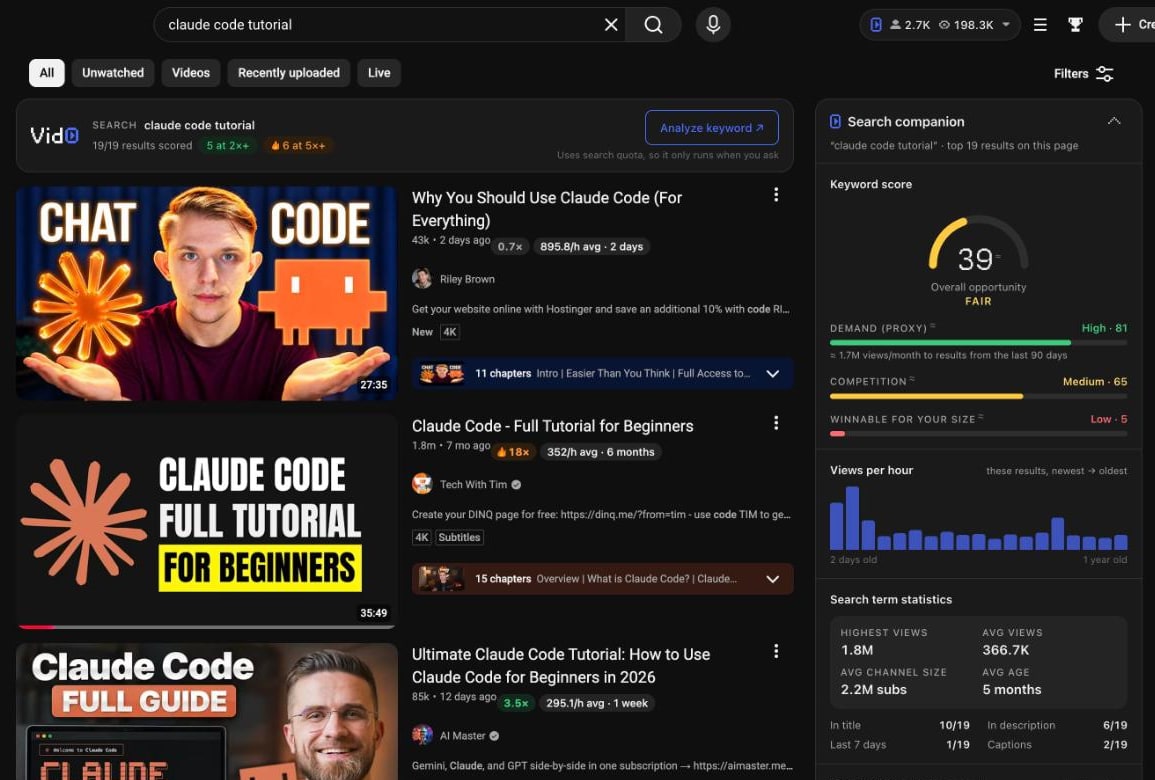
- Keywords you can win. Each keyword gets a score for demand and competition, plus "winnable for your size": how many top results come from channels like yours.
- Titles, thumbnails and descriptions. 0 to 100 scores with specific fixes, and AI drafts grounded in what's working in your niche. Titles are scored on the same six-point title checklist we publish.
- Your own channel. Read-only YouTube Analytics: KPIs, retention, traffic sources, a channel audit and video post-mortems.
- A free Chrome extension. Live on the Chrome Web Store since 22 October 2026: outlier scores, views per hour, tags and keyword scores on youtube.com, and a pre-publish assistant in YouTube Studio. It runs next to vidIQ.
- Brand deals. A free creator page (media kit) and a sponsorship rate calculator.
Pricing (October 2026): Free forever (3 tracked competitors, 5 keyword lookups a day and free daily tries of every AI tool). Creator is $12/month or $99/year (₹999/month or ₹6,999/year) with 1,000 AI credits a month. Pro is $29/month (₹2,499) with 3,000 credits and 3 connected channels. Agency starts at $99/month (₹7,999) for 25 channels. Every paid plan is sold in US dollars and Indian rupees. See Vid0 pricing.
Where it beats vidIQ: outlier scores that compare videos at the same age, keyword scores built around your channel's size, a lower starting price, rupee pricing and brand-deal tools built in.
Where vidIQ is better: vidIQ is far more established, with 4,000,000 Chrome Web Store users, a daily ideas feed, a thumbnail maker, an AI Coach and Instagram tools. Vid0 has no A/B testing, no bulk editing and no search-volume numbers.
For a feature-by-feature breakdown, see Vid0 vs vidIQ, or every Vid0 comparison.
2. TubeBuddy: best for A/B testing and bulk edits
TubeBuddy is vidIQ's oldest rival and the cheapest paid option on this list. It lives mostly inside YouTube Studio.
Pricing (October 2026): its pricing page lists Pro at $3/month ($32/year, or $49 for three years) and Legend at $15/month ($144/year, or $199 for three years), charged in US dollars. A free plan exists for channels without a paid licence.
Where it beats vidIQ: title and thumbnail A/B testing and bulk editing (Bulk Find, Replace & Append, bulk thumbnail overlays) across your back catalogue, at a low price. Both are Legend features.
Keep in mind: A/B testing and bulk tools aren't on Pro, a licence covers one channel, and TubeBuddy may treat a large channel as a business account. Full comparison: Vid0 vs TubeBuddy.
3. 1of10: best for outlier research and AI thumbnails
1of10 is built around outliers: videos that beat their channel's average by a wide margin.
Pricing (October 2026): Free gives 60 credits a month, with outlier search limited to 5 results. Basic is $19/month, or $15/month billed yearly ($180/year), with 150 credits and up to 3 channels. Pro is $89/month, or $69/month billed yearly, with 1,000 credits, unlimited channels and MCP and API access. Research tools never use credits; AI tools do (an AI thumbnail costs 4 credits, an Optimize run 18).
Where it beats vidIQ: a research tool focused almost entirely on what's breaking out, with an AI thumbnail generator and video editor alongside it.
Keep in mind: the useful research depth is on paid plans, and heavy AI use gets expensive above Basic. Full comparison: Vid0 vs 1of10.
4. OutlierKit: best for niche and keyword research
OutlierKit is a research tool for finding outlier videos, low-competition keywords with high RPM, and competitor insights.
Pricing (October 2026): a trial with 30 credits and no card, then Hobby at $299/year (100 credits a month), Pro at $599/year (500 credits, Competitor Studio, deep research, MCP and API) and Max at $1,999/year (2,000 credits, 50+ channels). Top-ups are $19 per 100 credits.
Where it beats vidIQ: keyword research that factors in RPM, niche-wide competitor research, and video idea scoring.
Keep in mind: the pricing page shows annual prices, so it's a bigger upfront commitment than a monthly plan, and there's no permanent free plan. Full comparison: Vid0 vs OutlierKit.
5. ViewStats: best for video and channel analytics
ViewStats is an analytics suite for YouTube creators, with a free account, a Pro plan and a Business plan from $249/month. The Pro price is shown in your currency; from India it showed ₹2,111.84 a month in October 2026.
Its Chrome extension shows views over time, title and thumbnail changes, and how a video ranks against the creator's previous uploads.
Where it beats vidIQ: clean views-over-time history and change tracking for any video.
Keep in mind: it's an analytics tool first, with less help writing titles or descriptions. Full comparison: Vid0 vs ViewStats.
6. TubeLab: best for finding a niche
TubeLab is a research toolkit for finding niches, outlier videos and trends, with a scriptwriter, AI avatar videos and a keyword rank tracker. It's popular with people starting new (often faceless) channels.
Pricing (October 2026): Starter, Pro and Team plans, billed monthly or yearly (yearly saves three months). The pricing page didn't show the amounts when we checked, so confirm at checkout. Starter covers 1 channel and 50 tracked keywords; Pro adds revenue and RPM data, niche and trend reports, up to 16 scripts a month and 5 channels.
Where it beats vidIQ: niche discovery with monetisation and RPM data, and a rank tracker for keywords.
Keep in mind: monetisation data and reports are Pro features, and it's aimed more at picking a niche than at running an established channel.
7. Morningfame: best for simple analytics on a small channel
Morningfame compares your channel with channels of a similar size and walks you through optimising each video for search.
Pricing (October 2026): Basic at $4.90/month and Plus at $12.90/month, taxes included. Basic limits the keyword tool and Niche Spy to a 24-hour window up to every 12 days; Plus includes both in full. It's invitation only, and the first month is free.
Where it beats vidIQ: a calmer, simpler tool for small channels.
Keep in mind: you need an invite code to join.
8. Social Blade: best for public stats history
Social Blade tracks public numbers for channels over time. It's free when logged in. Paid plans are billed yearly: Bronze $59.99, Silver $149.99, Gold $599.99 and Platinum $1,439.99 as of October 2026.
Where it beats vidIQ: long, simple subscriber and view history for any channel.
Keep in mind: it's a stats tracker, not an ideas or optimisation tool. Full comparison: Vid0 vs Social Blade.
9. Keyword Tool: best for YouTube search volume
Keyword Tool generates keyword ideas from YouTube autocomplete and, on Pro, shows search volume estimates.
Pricing (October 2026): Starter at $88/month, or $68/month billed yearly, up to Agency at $788/month. Every plan covers 17 platforms including YouTube. There's no free trial; it offers a 30-day money-back guarantee. Its page says YouTube volumes are estimates from clickstream data.
Where it beats vidIQ: bulk keyword ideas with volume estimates, across YouTube and other platforms.
Keep in mind: it's a keyword tool only, and the most expensive starting price on this list.
10. YouTube Studio: the free alternative you already have
YouTube Studio's own idea tools are changing. YouTube says it is gradually deprecating the Inspiration tab from August 2026 and points creators to Ask Studio for brainstorming ideas. Also in August 2026, YouTube started testing a new Research tab with a small number of creators. As reported by Tubefilter, it shows other creators' videos with an outlier multiplier and a filter for videos your own viewers watch.
Where it beats vidIQ: it's free, and only YouTube knows what your viewers actually watch.
Keep in mind: the Research tab is a limited test with no wider rollout announced, the Inspiration tab is being retired, and Studio has no keyword scores, competitor tracking or Chrome extension on youtube.com.
Also worth a look
Subscribr is closer to an AI production studio than a research tool: ideas, scripts, thumbnails and finished videos. It has a free plan; paid plans start at $99/month (pricing, October 2026).
Which vidIQ alternative should you pick?
- For a small channel that wants ideas and keywords it can win: Vid0.
- On a tight budget: TubeBuddy Pro at $3/month, or the free tiers of Vid0, 1of10 and ViewStats.
- For testing titles and thumbnails: TubeBuddy Legend.
- For outlier research plus AI thumbnails: 1of10.
- For keyword volume: Keyword Tool, or OutlierKit for RPM-aware keyword research.
- For tracking numbers over time: ViewStats or Social Blade.
- For picking a niche: TubeLab.
- For free, with no new account: YouTube Studio and its Ask Studio assistant.
Most of these have a free plan or trial, so run two side by side on your own channel for a week before paying. A good test: take one video idea, check it in both tools, and see which one changes your decision. Our guide to finding outlier videos works with any of them, and keyword research for small channels explains what "winnable" means.
FAQ
What is the best alternative to vidIQ?
It depends on the job. For a small channel that wants outlier ideas and keywords it can actually rank for, Vid0. For A/B testing and bulk edits, TubeBuddy. For outlier research with AI thumbnails, 1of10. For analytics, ViewStats.
Which vidIQ alternative is best for video ideas?
One built around outliers. Vid0 compares every video with its own channel's typical views at the same age and turns the winners into daily ideas, with a free plan. 1of10 adds AI thumbnails and idea generators, from $19/month. OutlierKit and ViewStats (on Pro) also find outliers.
Is there a free alternative to vidIQ?
Yes. As of October 2026, Vid0, TubeBuddy, 1of10, ViewStats and Social Blade all have a free tier, and YouTube Studio's own tools are free for every creator. vidIQ also has its own free plan with 150 AI credits a month.
What is the cheapest vidIQ alternative?
TubeBuddy Pro, at $3/month or $32/year as of October 2026. Morningfame Basic is $4.90/month but needs an invite. Vid0 Creator is $12/month or $99/year.
Is TubeBuddy better than vidIQ?
For A/B testing and bulk editing, yes: those are TubeBuddy Legend features. For AI tools, ideas and an all-round extension, vidIQ is broader. We compare all three in vidIQ vs TubeBuddy vs Vid0.
Can I use a vidIQ alternative alongside vidIQ?
Yes. The Vid0 Chrome extension is built to sit next to vidIQ on the same YouTube page, and most web-based tools here don't conflict with any extension.
Can I pay for these tools in rupees?
Vid0 sells every paid plan in Indian rupees. vidIQ and ViewStats show local prices. TubeBuddy charges in US dollars.
Create your creator profile today
Your stats, rates and past collabs on one link, like vid0.in/@yourchannel. Share it with brands and get booked.
Keep reading
All posts →- IndiaComparisons
The best YouTube tools for Indian creators (2026)
Free YouTube Studio tools plus vidIQ, TubeBuddy, Vid0, 1of10 and ViewStats compared for Indian creators, with rupee prices from each vendor's own page.
6 min read
- ComparisonsPricing
Best TubeBuddy alternatives in 2026
TubeBuddy alternatives compared on price, free plans and what they can change on your channel, from vidIQ and 1of10 to YouTube's own A/B tests and Vid0.
6 min read
- ComparisonsPricing
vidIQ vs TubeBuddy vs Vid0: best for a small channel?
vidIQ, TubeBuddy and Vid0 compared for small YouTube channels, with October 2026 prices in USD and INR, a feature table and a verdict by use case.
7 min read
Find your next outlier
Vid0 shows which videos broke out in your niche, why they did, and what you could make next.