YouTube keyword research for small channels: find topics you can win
Why search volume misleads small channels, how to check who actually ranks for a keyword, and how Vid0 scores whether a topic is winnable at your size.

5 min read
Keyword tools love big search-volume numbers. A small channel chasing them usually ends up on page five of the results, behind channels with a hundred times the subscribers. Here's a better way to choose topics when you're not big yet. It's step 3 of our guide to how to grow your YouTube channel.
Why does search volume mislead small channels?
Search volume tells you how big the crowd is, not whether you can get in front of it. "How to invest" has huge demand, and YouTube fills the top results with the biggest finance channels. "How to invest your first salary in India" has a fraction of the demand, but small channels rank for it all the time.
There's also a practical problem: YouTube doesn't publish keyword search volume, so the numbers you see in most tools are estimates from other sources. Vid0 doesn't show a search-volume number at all. It scores demand from what's publicly visible on YouTube instead.
How do you check who ranks for a keyword?
Do this by hand first:
- Search the keyword on YouTube in a private window, so your history doesn't skew the results.
- For each of the top 20 or so videos, note the channel's subscriber count, the video's views and how old it is.
- Count the results from channels close to your size, at most about 3 times your subscribers.
- Of those, how many did well? A good sign is a video with views at least half its channel's subscriber count, or one that beat that channel's usual views.
If a third or more of the top results are channels your size that did well, YouTube is willing to show small channels for this topic.
To see which related terms the top videos target, paste one into the free YouTube tag extractor. Tags are a small ranking signal, but they show what a creator was going after.
How does Vid0 score a keyword?
Vid0 runs the same check on the top 25 YouTube results for a keyword and turns it into four scores out of 100.
| Score | What it measures | How |
|---|---|---|
| Winnable | Whether channels your size do well here | The share of results from channels at most 3× your subscribers (never less than 3,000) that beat their own usual views. When a channel's usual views aren't known, a video counts if its views are at least half the channel's subscribers |
| Competition | How hard the results are to beat | Mostly the size of the channels ranking (50%), plus the share of million-subscriber channels (30%) and how fresh the results are (20%) |
| Demand | How much attention the topic gets right now | The combined views per hour of results from the last 90 days, scaled to a month. A proxy, not search volume |
| Opportunity | Demand you can realistically capture | Demand, discounted by competition |
Scroll sideways to see every column.
Winnable needs your subscriber count, so set your channel in Settings first. The Vid0 Chrome extension shows the same scores right on YouTube's search results page, worked out on your device from the results you're looking at.
What does a winnable keyword look like?
Usually a narrower, more specific version of a broad one. Here's a worked example. Say your channel has 4,000 subscribers. Channels "your size" are then those with up to 12,000 subscribers.
You check "budget gaming PC build" and find 6 of the top 25 results are from channels under 12,000 subscribers, and 4 of those beat their channel's usual views. Winnable is 4 out of 25 results, about 16. Most of the page belongs to big channels.
Then you check "budget gaming PC build for college students in India". Now 11 results are from channels your size, and 8 of them did well. Winnable is about 32. That's a topic YouTube already shows to channels like yours.
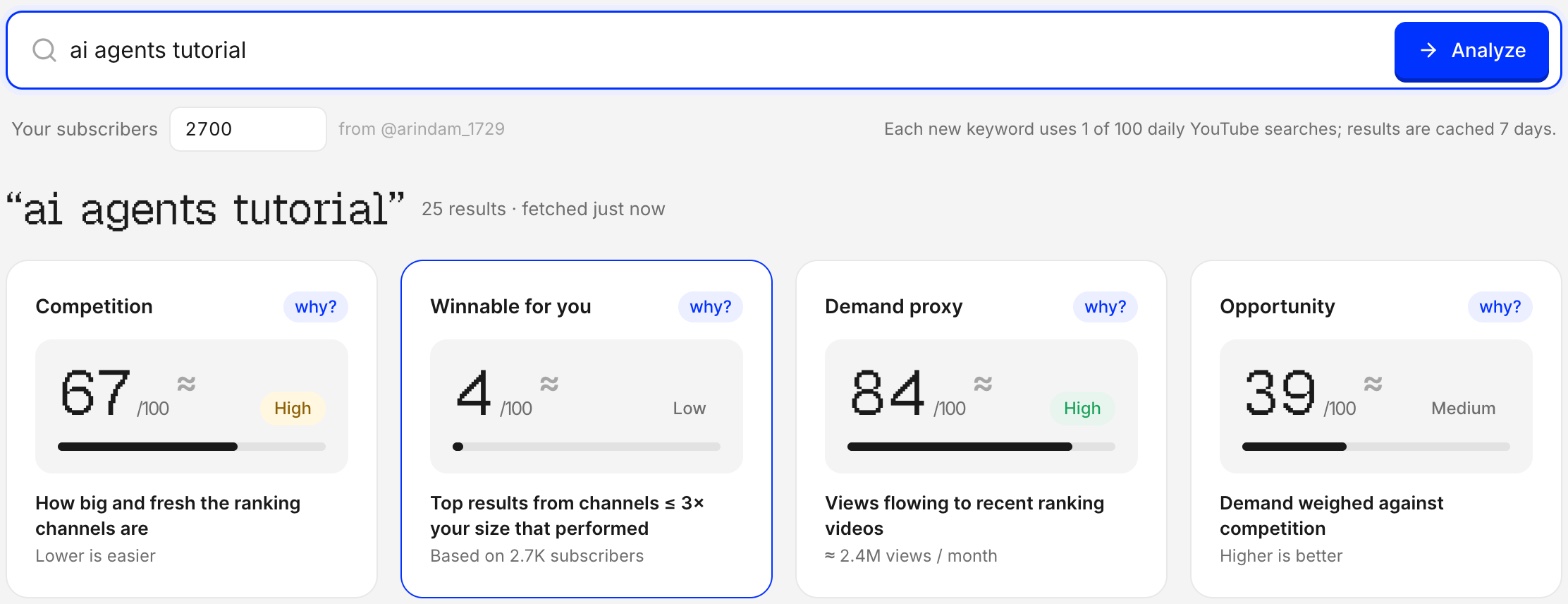
These numbers are made up to show the method. Here's a real one. For a channel with 2.7K subscribers, "ai agents tutorial" looks great on demand and terrible on Winnable:
The results behind the score show why. Every channel in the top nine has at least 12.5K subscribers, more than 3 times this channel's size:
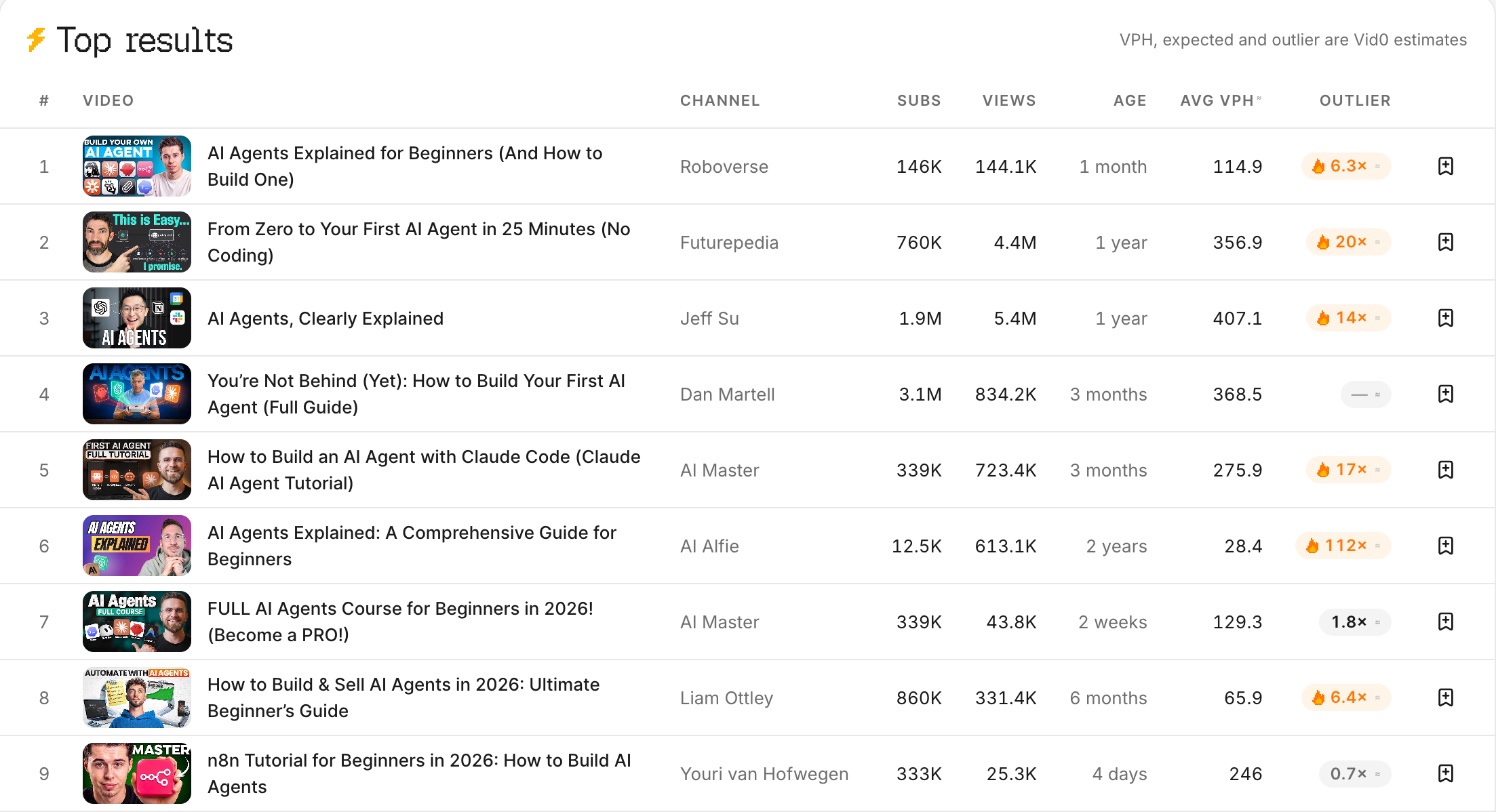
The pattern holds: adding who it's for, a place, a budget or a year usually makes a keyword more winnable.
How do you turn a winnable keyword into a video?
- Use the words people search in the first 40 characters of your title, where mobile cuts off. See the title checklist, or check it as you type in the free YouTube title checker.
- Look at the outliers among the results: what did the small channels that won do differently? Here's how to find outlier videos.
- Make the better version: more current, more specific or easier to follow than what's ranking now.
FAQ
What is a good keyword for a small YouTube channel?
One where channels close to your size already rank and do well, even if the overall demand is modest. Specific keywords (who it's for, a place, a budget, a year) are usually more winnable than broad ones.
Does YouTube show keyword search volume?
Not publicly. Tools that show search volume estimate it from other sources. Vid0 uses what's visible on YouTube instead: who ranks, how they did and how much attention recent videos get.
What does "winnable at your size" mean in Vid0?
It's the share of the top 25 YouTube results that come from channels with at most 3 times your subscribers and that beat their own usual views. Higher means YouTube already shows channels like yours for that keyword.
Should small channels avoid competitive keywords?
Not always, but don't build your channel on them. Use broad, competitive topics occasionally, and make most videos on winnable ones until you have an audience.
How many keywords should I check before making a video?
Check the main keyword plus three or four more specific versions of it, then pick the one with the best mix of demand and Winnable.
Create your creator profile today
Your stats, rates and past collabs on one link, like vid0.in/@yourchannel. Share it with brands and get booked.
Keep reading
All posts →- ComparisonsResearch
10 vidIQ alternatives compared (2026): free and paid
10 vidIQ alternatives compared on price, free plans and features, from Vid0 and TubeBuddy to 1of10, ViewStats and OutlierKit, with October 2026 prices.
13 min read
- ExtensionProduct
The Vid0 Chrome extension is live: free YouTube analytics on every page
Vid0's free Chrome extension is live. Outlier scores, views per hour, keyword odds, tags and channel stats on YouTube, plus a YouTube Studio assistant.
11 min read
- GrowthResearch
How to grow your YouTube channel: a practical playbook
A growth playbook for small and mid-size channels: pick a viewer, find proven ideas, package and hold attention, then use Shorts, analytics and collabs.
11 min read
Find your next outlier
Vid0 shows which videos broke out in your niche, why they did, and what you could make next.