The TubeBuddy alternative for deciding what to make next
TubeBuddy is great at managing the videos you've already made. Vid0 helps before that: which topics are working for channels your size, and which keywords you can actually win. Free to start, from $12 a month after that.
Free forever plan. No card. Works next to TubeBuddy.
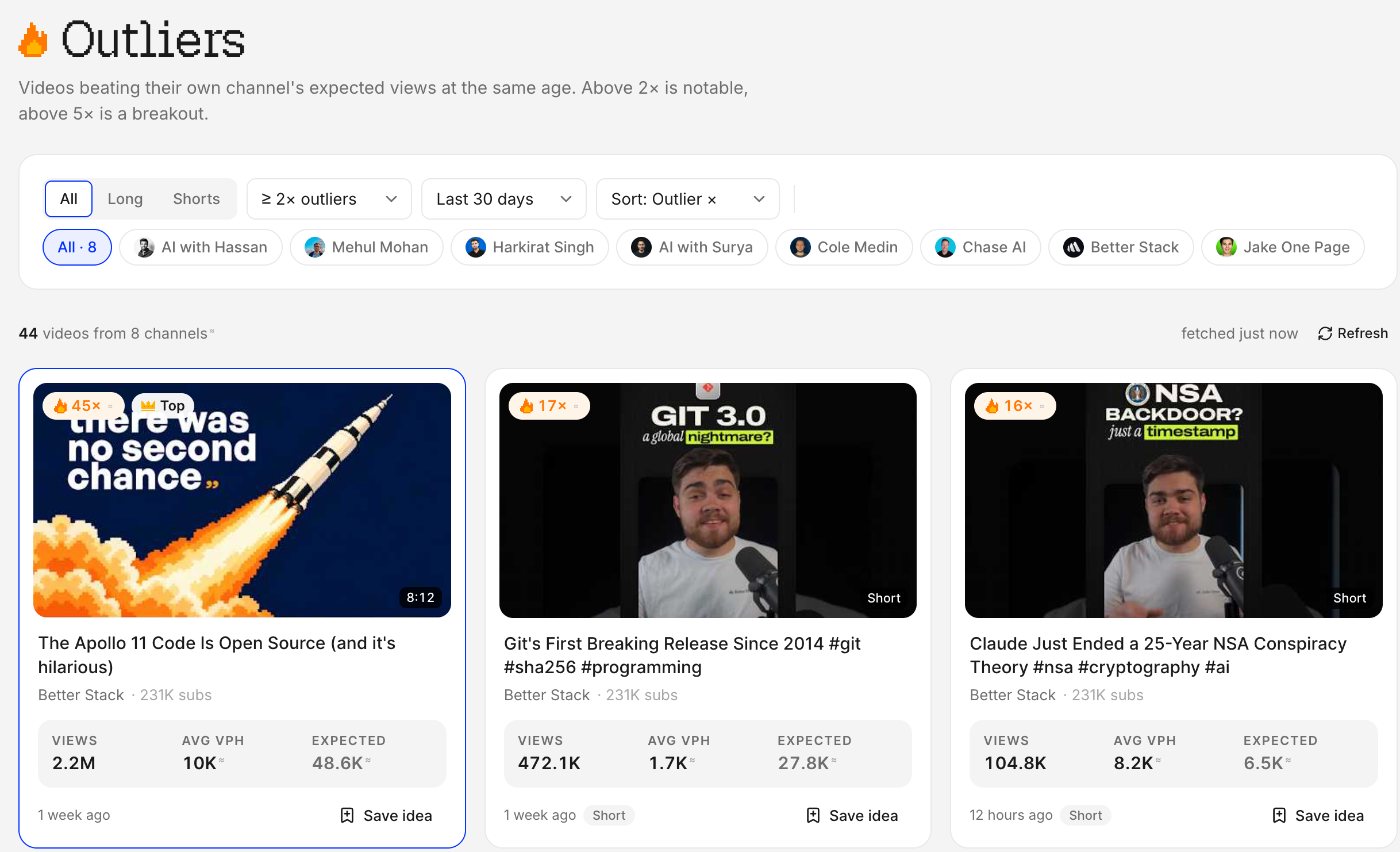
Real screenshot: 44 videos from 8 tracked channels beat their own channel's expected views at least 2× in 30 days.
Which one should you use?
Pick Vid0 to decide what to make: it finds videos beating their own channel at the same age and scores keywords for whether you can win them at your size, free to start, then $12/month. Stay with TubeBuddy for title and thumbnail A/B tests, bulk edits and the cheapest paid plan ($3/month).
Choose Vid0 if
- You want ideas backed by videos that beat their own channel
- You want keyword scores for your channel's size
- You want a free extension that works signed out
- You want brand-deal tools and rupee pricing
Stay with TubeBuddy if
- You want title and thumbnail A/B tests
- You edit cards, end screens or descriptions in bulk
- You want the cheapest paid plan
Or run both
- Vid0 for research, TubeBuddy for publishing
- Both run in Chrome on YouTube and in Studio
- Vid0's free plan has no time limit
Vid0 vs TubeBuddy
Vid0's column comes from our own plan catalog. TubeBuddy's is copied from its public pages, as of October 2026.
Free plan
Vid0Free forever, no card
TubeBuddyYes, a free plan
First paid plan
Vid0Creator: $12/month or $99/year
TubeBuddyPro: $3/month or $32/year
Next plan up
Vid0Pro: $29/month or $239/year
TubeBuddyLegend: $15/month or $144/year
Prices in rupees
Vid0Every plan, from ₹999/month
TubeBuddyCharged in US dollars
More than one channel
Vid03 on Pro, 25 on Agency
TubeBuddyOne channel per licence
Outlier scores
Vid0Every video against its own channel's typical views at the same age
TubeBuddyNot listed
Keyword research
Vid0Demand, competition and whether it's winnable at your channel's size
TubeBuddyKeyword Explorer on every plan, plus Rank Tracker
A/B testing
Vid0No
TubeBuddyTitles and thumbnails, on Legend
Bulk editing
Vid0No
TubeBuddyFind, replace and append, cards and end screens, on Legend
Chrome extension
Vid0Free; scores and stats work signed out
TubeBuddy1,000,000 users, rated 3.5
YouTube Studio assistant
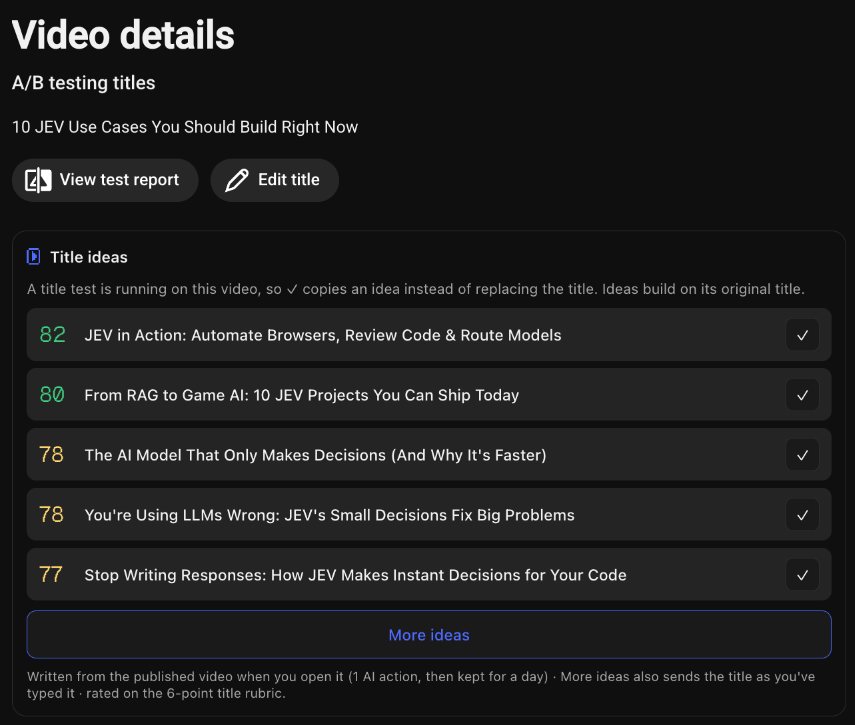
Vid0Title ideas, description score, checklist, forecast, best time
TubeBuddyYes, SEO Studio and upload tools
Thumbnails
Vid0Thumbnail critiques and a feed preview
TubeBuddyThumbnail Analyzer and Generator
MCP server for AI assistants
Vid0Yes, read tools on Free
TubeBuddyNot listed
Brand deals
Vid0Free creator page, rate calculator and brand intros
TubeBuddyNot listed
Sources: TubeBuddy pricing, TubeBuddy features, TubeBuddy on the Chrome Web Store. Prices are list prices, before tax unless a row says otherwise, and change often. “Not listed” means we couldn't find it there, not that it can't exist.
Numbers that fit your channel
Outliers judged at the same age
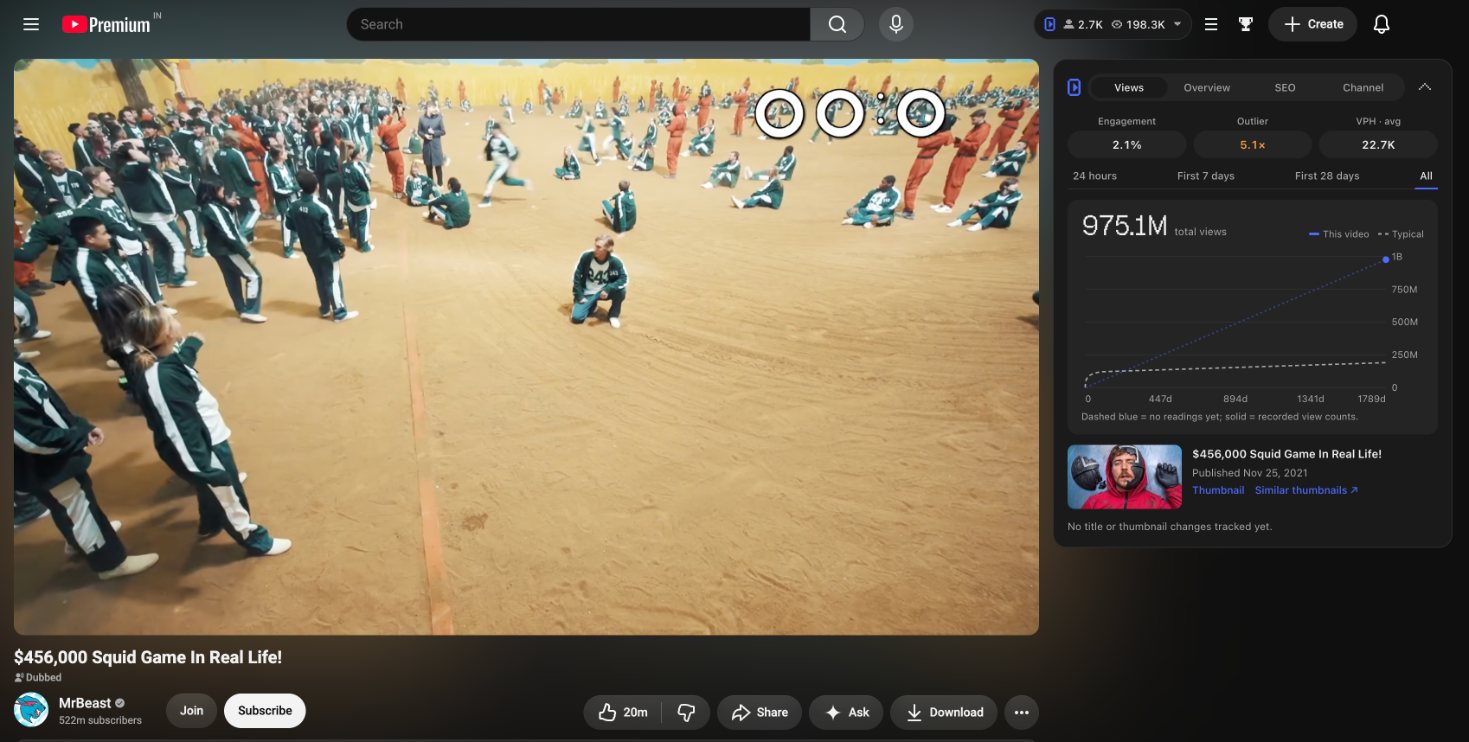
A video's views only mean something next to its own channel's usual numbers, for a video that old. Vid0 compares every video that way, so a three-day-old upload and a three-year-old one are judged fairly.
- 2×, 5× and 10× outliers from the channels you track
- Every saved idea keeps the videos that inspired it
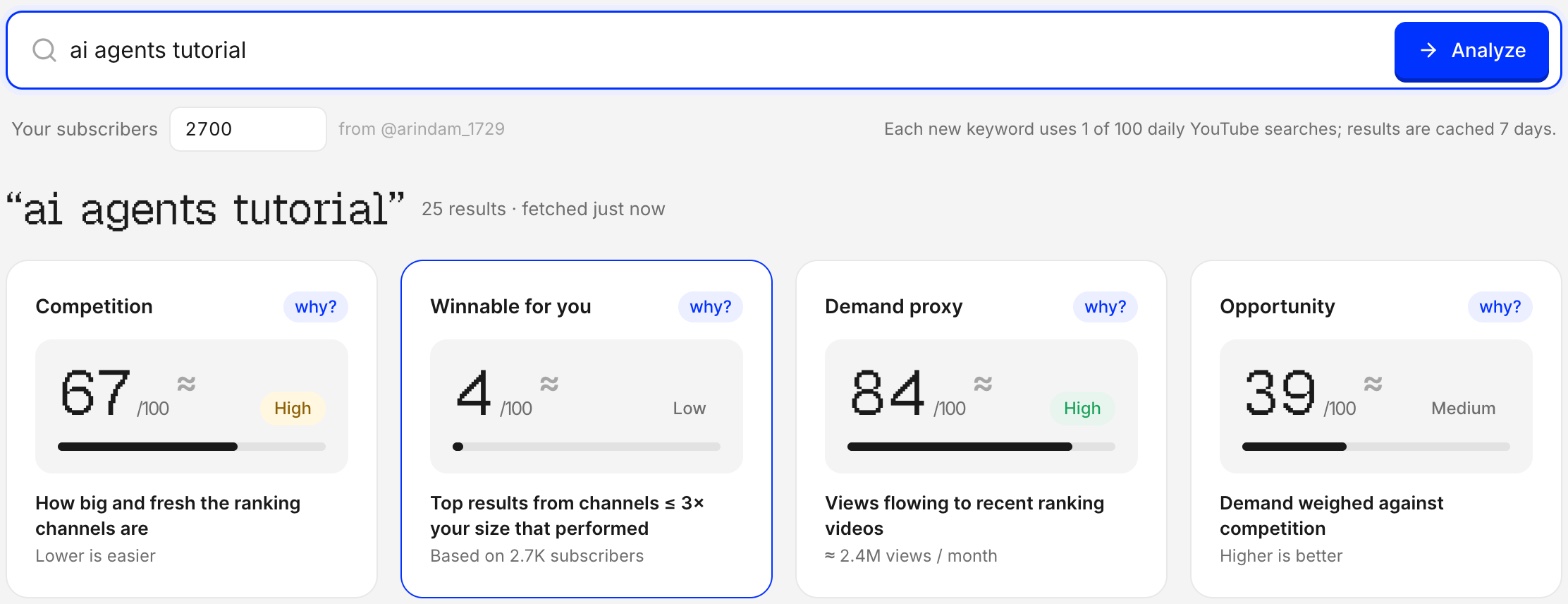
Keywords you can actually win
Demand and competition tell you if a topic is popular. Vid0 adds the question that matters to a small channel: how many of the top results come from channels your size?
- Keyword score from 0 to 100
- Winnable for your size, from the real top results
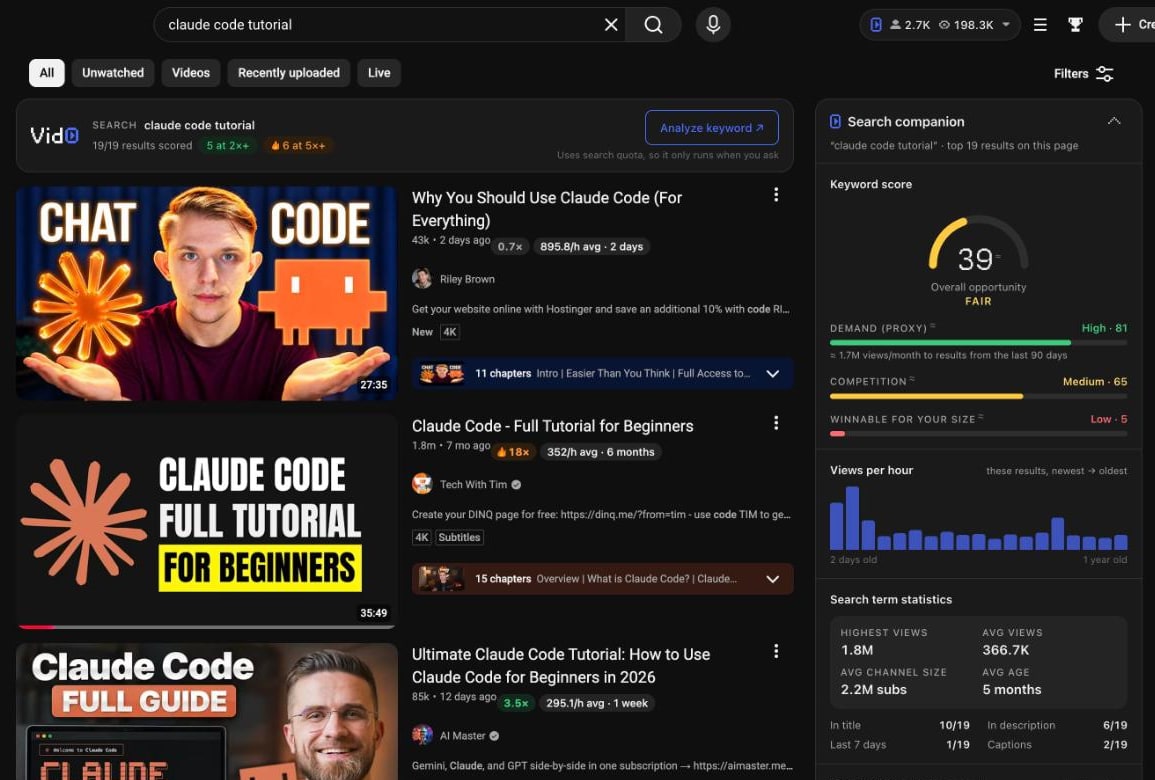
A free extension that works signed out
Outlier scores, views per hour, tags and keyword scores right on youtube.com, and a pre-publish assistant in YouTube Studio. It leaves room for the other extensions you use.
- Badges on every search result and related video
- Title ideas and a description score in Studio
Check it before you publish
Open a video in Studio and Vid0 drafts title ideas from what it's about, scores your description part by part, and shows the hours your past uploads did best.
- Rated title ideas, inserted with one click
- A description score you can actually fix
Where TubeBuddy is still better
- Its paid plans are cheaper: Pro is $3/month and Legend $15/month.
- Title and thumbnail A/B testing, on Legend. Vid0 has no A/B testing.
- Bulk editing across your back catalogue: descriptions, cards and end screens.
- Upload tools in Studio, like scheduling, default upload profiles and a chapter editor.
Want the wider field? We compare ten tools in 10 vidIQ alternatives compared, or see every Vid0 comparison.
Set up in five minutes
1 Sign up free
Sign in with Google or email. No card, and the free plan has no time limit.
2 Connect and track
Connect your channel read-only and add the channels you watch. Keep TubeBuddy for bulk edits if you use them.
3 Add the extension
Install it from the Chrome Web Store. It works next to TubeBuddy, so you can compare them on your own channel.
Comparisons and guides
Good to know
What is the best TubeBuddy alternative?
Is there a free TubeBuddy alternative?
Does Vid0 do A/B testing like TubeBuddy?
Can I use Vid0 and TubeBuddy together?
Is TubeBuddy cheaper than Vid0?
Create your creator profile today
Your stats, rates and past collabs on one link, like vid0.in/@yourchannel. Share it with brands and get booked.
Try Vid0 next to TubeBuddy
Free forever plan, no card. See which one changes your next video.