How to check any YouTube channel's stats and earnings
Which YouTube channel stats are public, how to check them free, and how earnings estimates work, with a worked example and why they can be far off.

7 min read
Looking up a channel's numbers is the first step in sizing up a competitor, a collaborator or a sponsorship. Some are public and exact. Others, earnings above all, can only be estimated. Here's which is which, and how much to trust an earnings figure.
What YouTube channel stats are public?
| Public (anyone can see) | Private (only the channel and people it gives access) |
|---|---|
| Subscriber count, rounded (unless hidden) | Revenue and RPM |
| Total channel views | Watch time and average view duration |
| Number of public videos | Impressions and click-through rate |
| Views, likes and comments on each video | Traffic sources and search terms |
| Publish date of each video | Audience age, gender and country |
| Join date and country (if set) | Dislike counts |
A few details from the YouTube Data API reference, which is where analytics tools get these numbers:
- The subscriber count is "rounded down to three significant figures", and a channel can hide it. YouTube's own subscriber count help page gives the example of 1,234,567 subscribers showing as 1.23M.
- The video count covers public videos only, so unlisted and private uploads aren't in it.
- Dislike counts became private on 13 December 2021, according to the videos reference.
Everything in the right-hand column lives in YouTube Analytics, which only the channel owner can open. Any tool that shows those numbers for someone else's channel is guessing.
How do I check a channel's stats for free?
- Open the channel page and click more after the channel description. The About panel shows exact total views, the number of videos, the join date and the country.
- Work out average views per video: total views ÷ number of videos.
- Open the Videos tab and look at the views on the last 10 to 20 uploads. This tells you what the channel gets now, not what it got years ago.
Here's what that looks like for Unique Japan Travel, a Japan travel channel. On 18 October 2026 its About panel showed 29,343,020 views, 48 videos, joined 30 May 2023 and country Japan.
29,343,020 ÷ 48 ≈ 611,300 views per video.
That's a real number, but it flatters the channel. A handful of big hits pull an average up a long way. Its recent long-form uploads that are at least a week old have a median of about 205,700 views, a third of the average. If you're deciding what a sponsored video on this channel is likely to get, the median is the better guide. How much to charge for a YouTube sponsorship explains why typical views, not averages or subscribers, are what brands pay for.
How are YouTube earnings estimated?
Only the channel and YouTube know what a channel earns. Every public estimate uses the same idea:
views ÷ 1,000 × an assumed RPM
RPM is revenue per mille. YouTube's help page Understand ad revenue analytics defines it as "how much money you've earned per 1,000 video views" and explains how it differs from CPM:
- CPM is what advertisers pay per 1,000 ad impressions, before YouTube takes its share.
- RPM is what the creator ends up with per 1,000 views. It's lower than CPM because it's calculated after YouTube's revenue share and it "includes all views, including ones that weren't monetized".
RPM is the right number to multiply views by, because it already accounts for views without ads. The problem is that nobody outside the channel knows it. The same help page lists what moves ad prices: the time of year, where viewers are, who advertisers target, whether the content is advertiser-friendly and which ad formats are available. Two channels with the same views can earn very different amounts.
The split is also different for Shorts. YouTube's partner earnings overview says long-form partners get 55% of net ad revenue on their videos, while Shorts partners get 45% of the revenue allocated to them from a shared pool based on their share of views. That's one reason Vid0 assumes a much lower RPM for Shorts.
How does Vid0 estimate a channel's earnings?
The Vid0 Chrome extension adds a Channel stats button to every channel page. The quick stats open right there:
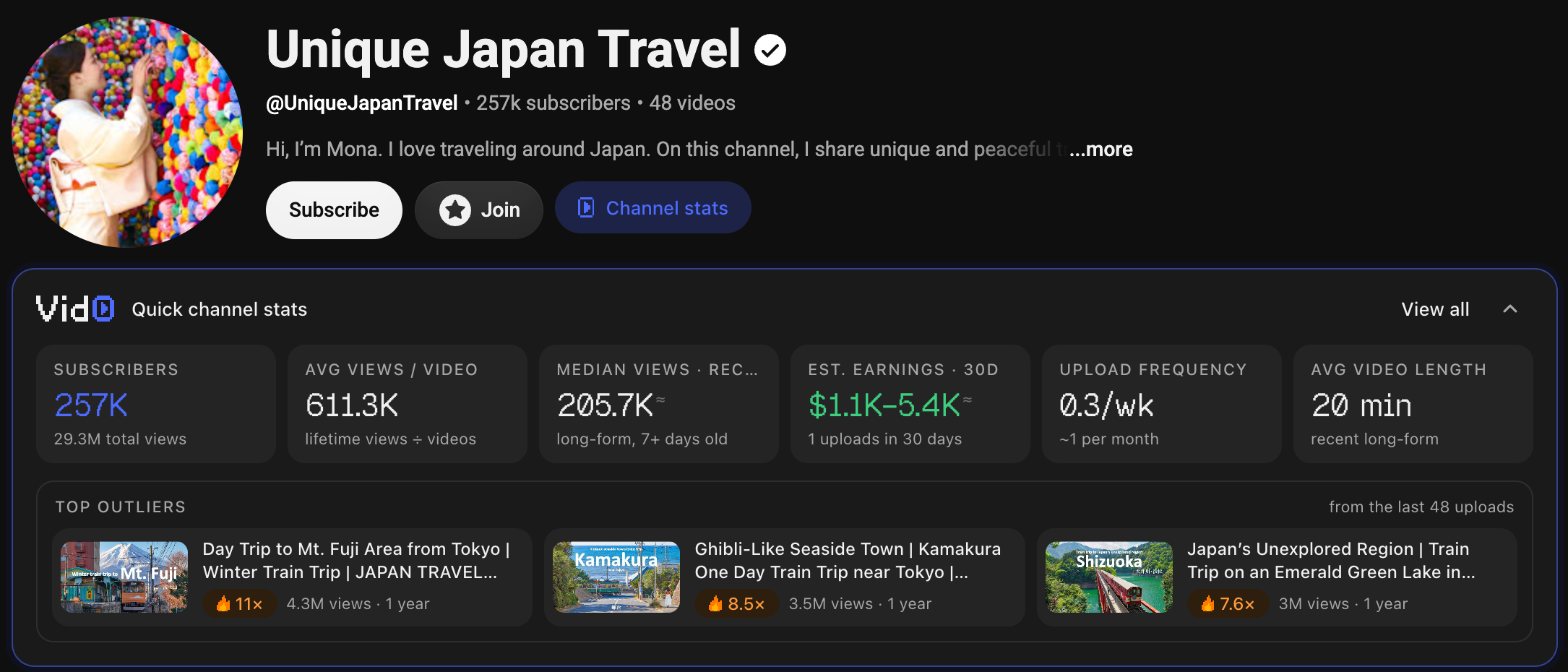
The earnings tile is worked out like this:
- Take the channel's uploads published in the last 30 days.
- Add up their views, keeping long-form and Shorts separate.
- Multiply long-form views by $1 to $5 per 1,000 and Shorts views by $0.03 to $0.08 per 1,000.
- Show the low and high ends as a range.
For Unique Japan Travel, one video went up in the last 30 days, a long-form video with about 1.08 million views. No Shorts.
- Low: 1,080 × $1 = $1,080, shown as $1.1K
- High: 1,080 × $5 = $5,400, shown as $5.4K
These RPM ranges are Vid0's own rough assumptions, deliberately wide, and every number on the tile is marked as an estimate. They're Vid0 estimates, not YouTube data.
Why can an earnings estimate be far off?
Very far, in either direction:
- Older videos still earn. The estimate only counts uploads from the last 30 days. A channel whose old videos keep getting views earns more than this shows. Unique Japan Travel's three biggest outliers are all about a year old, and none of their views are counted.
- New videos' views aren't all from this month. Views on a video published 29 days ago count in full, and a single upload, like here, makes the number jumpy.
- The channel may not be monetised. A channel outside the YouTube Partner Program earns nothing from ads, whatever its views.
- The RPM range is wide on purpose. The high end is five times the low end, and a channel's real RPM can sit outside it, depending on its niche and where its viewers are.
- Ads aren't the whole business. Sponsorships, merchandise and affiliate links don't show up in views at all, and memberships depend on how many fans pay, not on views.
Use the estimate to tell a hobby channel from a business, not to quote a figure.
What else does the full channel panel show?
View all opens the full panel, with the same tiles plus a few more:
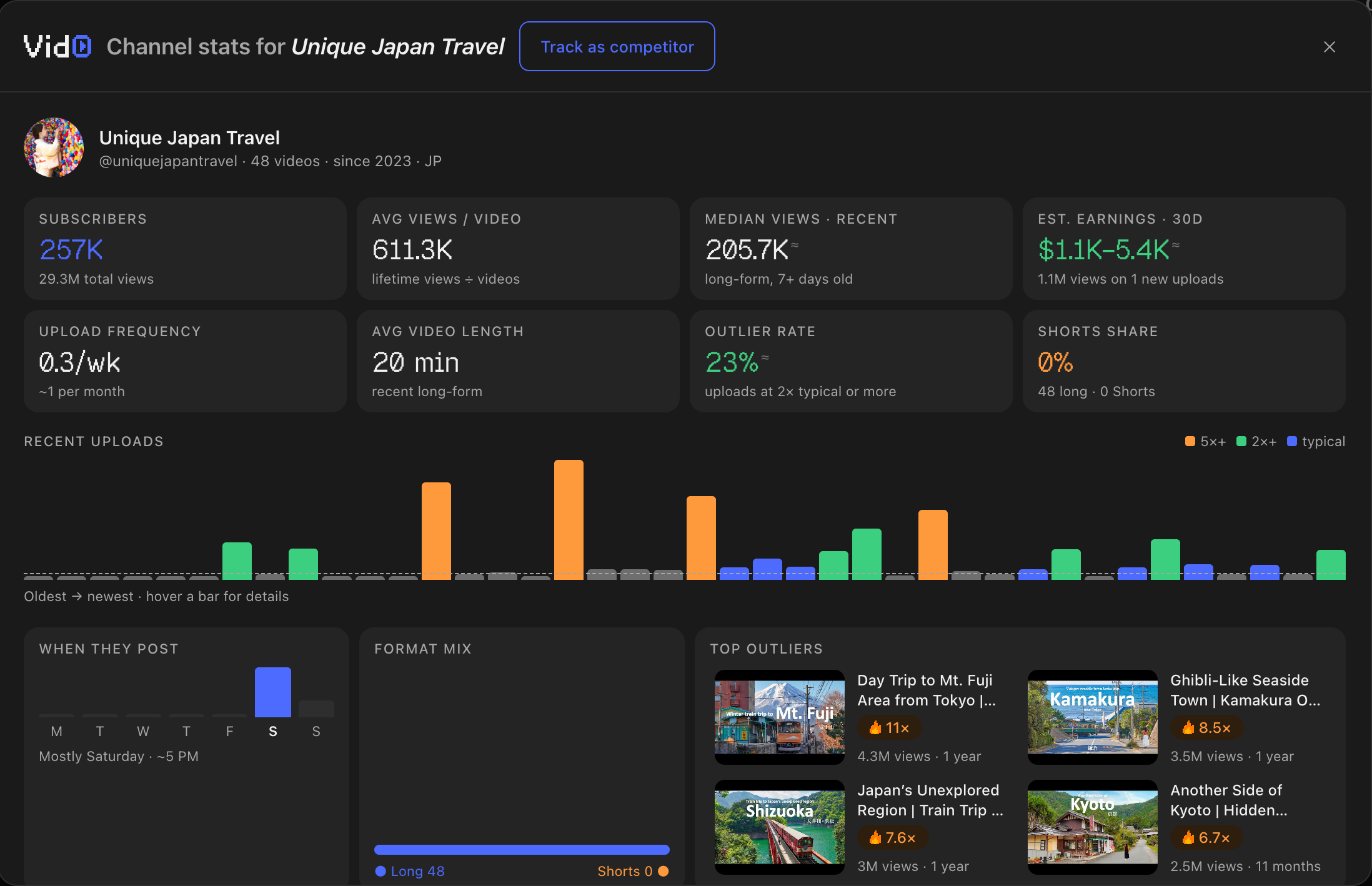
- Upload frequency: uploads per week across the channel's recent uploads (up to its last 50). 0.3 a week is about one a month.
- Outlier rate: the share of recent uploads that did at least 2× the channel's usual views at the same age. 23% here, which is high. How to read an outlier score explains the baseline.
- Shorts share: this channel is all long-form.
- When they post: the most common upload day and hour, in your time zone. Here, mostly Saturday around 5 PM.
- Top outliers: the videos that beat the channel's usual by the most, which are often the best ideas to study.
- Track as competitor, which adds the channel to your Vid0 dashboard.
If you want to see where a channel ranks overall, Vid0 also publishes rankings of the most subscribed YouTube channels by country and category. For how fast a single video is moving, read what views per hour (VPH) means, and for why the same views earn less from an Indian audience, see how much Indian YouTubers earn per 1,000 views.
FAQ
Can I see how much a YouTube channel earns?
No. Earnings are only visible to the channel in YouTube Analytics. Every public figure is an estimate built from views and an assumed RPM.
What is a typical YouTube RPM?
It varies a lot by niche, audience country, season and format, so there's no single answer. Vid0 assumes $1 to $5 per 1,000 long-form views and $0.03 to $0.08 per 1,000 Shorts views as a rough range.
What's the difference between RPM and CPM?
CPM is what advertisers pay per 1,000 ad impressions. RPM is what the creator earns per 1,000 views after YouTube's share, counting views that had no ads. RPM is always lower.
Why is a channel's subscriber count rounded?
YouTube rounds public subscriber counts down to three significant figures, so 1,234,567 shows as 1.23M. Channels can also hide the count completely.
Why is average views per video so different from recent views?
The average includes every video the channel ever made, so a few old hits pull it up. The median of recent uploads is a better guide to what a new video gets.
Create your creator profile today
Your stats, rates and past collabs on one link, like vid0.in/@yourchannel. Share it with brands and get booked.
Keep reading
All posts →- KeywordsResearch
How to see the tags on any YouTube video (free)
YouTube hides video tags, but every watch page carries them in its source. How to see them free, and why YouTube says they matter less than you think.
6 min read
- ExtensionComparisons
Best Chrome extensions for YouTube creators (2026)
Eleven Chrome extensions for YouTube creators, for analytics, keywords, thumbnails, transcripts and focus, with store user counts and which work without an account.
9 min read
- AnalyticsOutliers
What is views per hour (VPH) on YouTube? How to read it
What VPH means, how to work it out for any video, the difference between average and live VPH, and why a good VPH depends on the channel.
7 min read
Find your next outlier
Vid0 shows which videos broke out in your niche, why they did, and what you could make next.