Best Chrome extensions for YouTube creators (2026)
Eleven Chrome extensions for YouTube creators, for analytics, keywords, thumbnails, transcripts and focus, with store user counts and which work without an account.

9 min read
Extensions are the cheapest way to make YouTube itself more useful. The right ones put numbers on the pages you already browse, so you research while you watch instead of switching between tabs. The wrong ones slow YouTube down and fight each other for the same space on the page.
Every extension below has a live Chrome Web Store listing. We copied user counts and ratings from each listing on 6 November 2026, and they change daily; the store rounds big counts down, so 4,000,000 means at least that many. Vid0 is our product; its extension is included as one entry, with its limits stated.
Which YouTube extensions are worth installing?
| Extension | What it's for | Users (Nov 2026) | Rating (Nov 2026) |
|---|---|---|---|
| vidIQ Vision for YouTube | All-round analytics and SEO | 4,000,000 | 4.8 (11.5K ratings) |
| TubeBuddy for YouTube | SEO, A/B tests, bulk tools | 1,000,000 | 3.5 (8.5K ratings) |
| 1of10.com Optimization Tool | Outliers and packaging research | 30,000 | 4.0 (35 ratings) |
| Viewstats | Views over time and change history | 100,000 | 3.9 (242 ratings) |
| OutlierKit | Outlier multipliers on channel pages | 662 | 5.0 (2 ratings) |
| Vid0 | Outliers, keyword odds, Studio checks | 20 (listed 22 Oct 2026) | 5.0 (3 ratings) |
| Keywords Everywhere | Keyword data across sites | 1,000,000 | 3.3 (5.7K ratings) |
| PrevYou | Thumbnail and title preview | 6,000 | 4.6 (50 ratings) |
| YouTube Summary with ChatGPT & Claude | Summaries and transcripts | 2,000,000 | 4.2 (4.1K ratings) |
| Unhook | Hiding distractions | 1,000,000 | 4.9 (4.6K ratings) |
| Enhancer for YouTube | Playback control | 1,000,000 | 4.5 (17.6K ratings) |
Scroll sideways to see every column.
Which analytics and research extensions should you use?
Most creators only need one of these. They all add numbers to YouTube's pages, and several on top of each other get cluttered.
vidIQ Vision: the established all-rounder
vidIQ's listing describes a vidIQ Score for every video, views per hour, a channel audit, competitor tracking, the tags on any video, CSV export and title, keyword and thumbnail ideas inside YouTube Studio. Its extension page says it now works on Instagram too. It has the largest user base and the highest rating of the research tools here. If you want one mature extension and don't want to think about it, start here.
TubeBuddy: best for A/B tests and bulk changes
TubeBuddy's listing describes 50+ tools, integration with YouTube Studio, keyword tools, A/B tests, bulk edits across many videos, and card and end screen templates, with free and paid licences. Its pricing page puts A/B Testing and the bulk find-and-replace tools on the Legend plan ($15/month as of October 2026). Nothing else on this list edits videos in bulk.
1of10: outliers and packaging history
1of10's listing says it scores every video as an outlier while you browse, ranks videos against the channel's last 10 uploads, and shows view growth charts, title and thumbnail change history, similar titles and thumbnails, and a thumbnail previewer. It's a good fit if most of your research is "which videos broke out, and how were they packaged?".
Viewstats: clean history for any video
The Viewstats listing focuses on analysis: an interactive views-over-time graph, title and thumbnail changes, how a video ranks against the creator's previous nine uploads, side-by-side video comparisons and one-click channel analytics. The listing notes that not every video or channel is in its database yet, and you can enable tracking for missing ones.
OutlierKit: outlier multipliers while you browse
OutlierKit's extension puts outlier multipliers on a channel's pages and Videos list, and an Analyze button opens a fuller report on outlierkit.com. The extension is free; OutlierKit's own research app is a paid plan billed yearly. It's a good fit if you mostly check one channel at a time and want the deeper report a click away.
Vid0: outliers, keyword odds and Studio checks
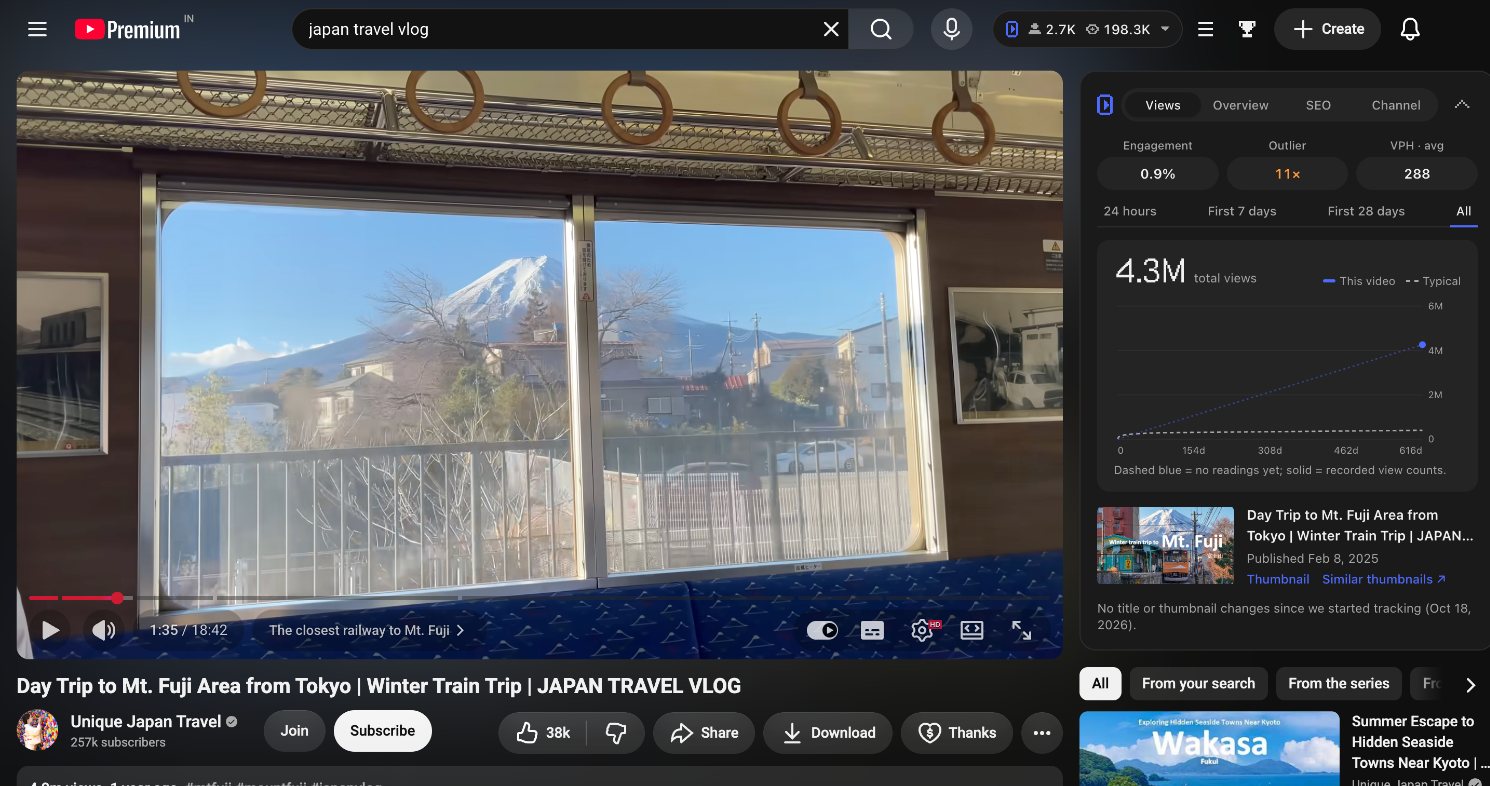
The Vid0 extension adds a scorecard beside every video (outlier score, views per hour, a views chart, tags, and title and thumbnail change history), a keyword panel next to search results, stats on every channel page and pre-publish cards inside YouTube Studio. Its outlier score compares each video with its own channel's typical views at the same age.
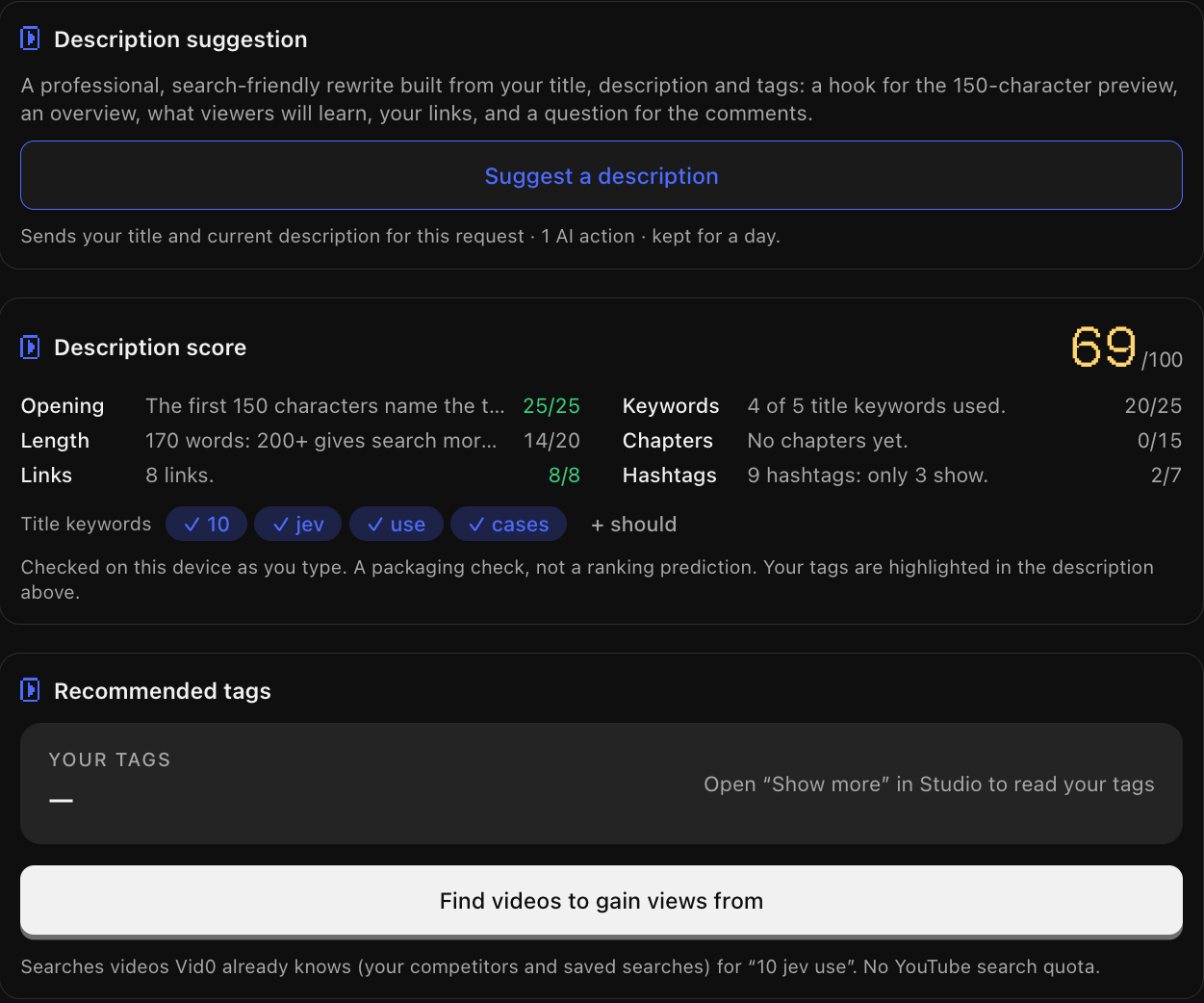
In Studio, it scores your description out of 100 and tells you which part to fix first.
The scores, stats and search companion work without an account; the AI tools need a free Vid0 account. The honest limits: it's new on the Chrome Web Store, with 20 users and 3 ratings on 6 November 2026, there's no A/B testing or bulk editing, and it's newer than everything else in this section. Lookups that use AI or keyword research count against your Vid0 plan's limits. It's built to sit next to vidIQ on the same page.
Which YouTube analytics extensions work without an account?
If you want numbers on YouTube without signing up for anything, the list gets shorter. Here's what each research extension's own listing or help pages said on 6 November 2026. We read the vendors' pages rather than installing every extension, so check what each one shows after you install it.
| Extension | Works without an account? | What its own pages say |
|---|---|---|
| Vid0 | Yes | Scores, stats and the search companion work without an account; the AI tools need a free account |
| Outlier Finder by moreoften.io | Yes | Its listing says no account and no setup. 509 users |
| VidNinjas | Yes, for core features | Its listing says no account is needed for core features. 1,000 users |
| VideoCore Lens | Partly | Its listing says views and rates show as ranges without an account; sign in for exact numbers. 28 users |
| OutlierKit | Unclear | Its newer pages say no account is needed, but its April 2026 setup guide says you need an OutlierKit account, or its free trial, to see outlier data |
| Viewstats | Not stated | Neither its listing nor its help article on the extension mentions signing in |
| 1of10 | No, a free account | Its install guide says to sign in to a 1of10 account; a free one is enough for the scores |
| vidIQ Vision | Expects a login | Its help center says to check you're logged in if the tools don't show on YouTube |
| TubeBuddy | Expects a registered channel | Its help center says the menus appear once you've added your channel and signed in |
Scroll sideways to see every column.
Outlier Finder, VidNinjas and VideoCore Lens are small, newer extensions, which is why they aren't in the main table. If you'd rather not create an account, try Vid0 or Outlier Finder for outlier scores; if you'll sign up anyway, 1of10's free account is a good place to start.
Which extension helps with YouTube keywords?
Keywords Everywhere shows keyword data on Google, YouTube and more than 15 other sites. Its listing says the free version includes YouTube search insights, SERP metrics, video insights and tags, while the paid version adds monthly search volume, CPC and trend data. It's useful if you also write blog posts or run a website alongside your channel.
Keep in mind that YouTube doesn't publish search volume, so any volume number is an estimate. For a small channel, who ranks matters more than how many people search. Our guide to keyword research for small channels explains why.
How can you preview a thumbnail before publishing?
PrevYou drops your thumbnail and title onto the real YouTube home page or subscription feed so you can see them next to other videos. Its listing says it's open source, doesn't need a login, can place your thumbnail at random so you have to find it yourself, and has a dark mode. It was last updated in September 2025, so it's simple rather than actively growing. vidIQ, 1of10 and Vid0 include thumbnail previews too, if you already use one of them.
Which extension gets you a video's transcript?
YouTube Summary with ChatGPT & Claude (by Glasp) summarises videos, articles and PDFs using ChatGPT, Claude, Mistral AI or Gemini. For creators, the useful part is the "Copy Transcript" button the listing describes: paste a competitor's transcript into your notes to study their structure, or copy your own to draft a description or blog post. Summaries are only as good as the video's captions, so check anything you quote.
Which extensions help you focus while researching?
Unhook hides YouTube's recommended sidebar, home feed, Shorts, comments, end screens, trending tab and "related to your search" results. That's useful when you sit down to research one topic and don't want the algorithm pulling you elsewhere. Every option is a toggle, so you can switch things back on.
Enhancer for YouTube controls playback: default speed from 0.07x to 16x, loop sections, volume boost, a wider player and themes. It's handy for watching competitor videos at speed or looping a hook you want to study.
How many YouTube extensions should you install?
Fewer than you think. Pick one research extension (vidIQ, TubeBuddy, 1of10, Viewstats, OutlierKit or Vid0), then add single-purpose tools only if you'll use them every week. Every extension adds work to each page load, and two analytics tools often draw into the same spot.
Before installing, read the listing's privacy section and permissions. An extension that only works on YouTube should only need access to YouTube and its own site. Then use what it shows you: start with how to find outlier videos in your niche. For the full products behind these extensions, including plans and prices, see vidIQ alternatives compared.
FAQ
What is the best free Chrome extension for YouTube creators?
For research, vidIQ's free extension is the most established, with 4,000,000 users and a 4.8 rating on its listing as of November 2026. TubeBuddy, 1of10 and Viewstats also have free tiers. If you don't want an account, Vid0 shows outlier scores, views per hour and channel stats signed out. For focus, Unhook is free.
Which YouTube analytics extension works without an account?
As of 6 November 2026, Vid0 and Outlier Finder by moreoften.io say on their listings that they work without an account, and VidNinjas says its core features do. VideoCore Lens shows ranges until you sign in. 1of10 needs a free account, and vidIQ and TubeBuddy expect you to log in.
Can I use vidIQ and TubeBuddy together?
You can install both, but they add similar panels to the same pages, which gets cluttered. Most creators pick one research extension and add smaller tools around it.
Is the Vid0 Chrome extension available?
Yes. It's free on the Chrome Web Store, works without an account and runs in Chrome, Edge, Brave and Arc. The extension page shows what it does, with real screenshots.
Are YouTube Chrome extensions safe?
Check the listing before installing: who offers it, when it was last updated, what data it says it collects and which sites it can access. Avoid extensions that ask for access to every website when they only need YouTube.
Do YouTube extensions work in other browsers?
Many do. Vid0's extension works in Chromium browsers like Edge, Brave and Arc, and some extensions, like Unhook, publish separate Firefox and Edge versions. Check each developer's site.
Create your creator profile today
Your stats, rates and past collabs on one link, like vid0.in/@yourchannel. Share it with brands and get booked.
Keep reading
All posts →- ComparisonsResearch
10 vidIQ alternatives compared (2026): free and paid
10 vidIQ alternatives compared on price, free plans and features, from Vid0 and TubeBuddy to 1of10, ViewStats and OutlierKit, with October 2026 prices.
13 min read
- ExtensionProduct
The Vid0 Chrome extension is live: free YouTube analytics on every page
Vid0's free Chrome extension is live. Outlier scores, views per hour, keyword odds, tags and channel stats on YouTube, plus a YouTube Studio assistant.
11 min read
- ResearchGrowth
How to find YouTube video ideas: 9 methods that work
Nine ways to find YouTube video ideas, from outliers and search suggestions to your own past winners, and how to check an idea before you film it.
10 min read
Find your next outlier
Vid0 shows which videos broke out in your niche, why they did, and what you could make next.