How to find YouTube video ideas: 9 methods that work
Nine ways to find YouTube video ideas, from outliers and search suggestions to your own past winners, and how to check an idea before you film it.

10 min read
Running out of ideas is rarely the real problem. The problem is ideas with no evidence behind them. Each method below gives you ideas that come with a reason to believe someone wants to watch.
1. Which videos are outliers in your niche?
An outlier is a video that got far more views than its channel usually gets at the same age. It's the strongest evidence you can find, because it shows an idea working with an audience, not just a big channel doing normal numbers.
To find them:
- List 10 to 20 channels whose audience overlaps with yours, including some your size.
- Compare each recent video with that channel's typical views at the same age.
- Keep anything at 2× or more. Study anything at 5× or more closely.
To try it without an account, paste up to three of those channels into Vid0's free video idea generator. It ranks every recent upload that beat its own channel at the same age.
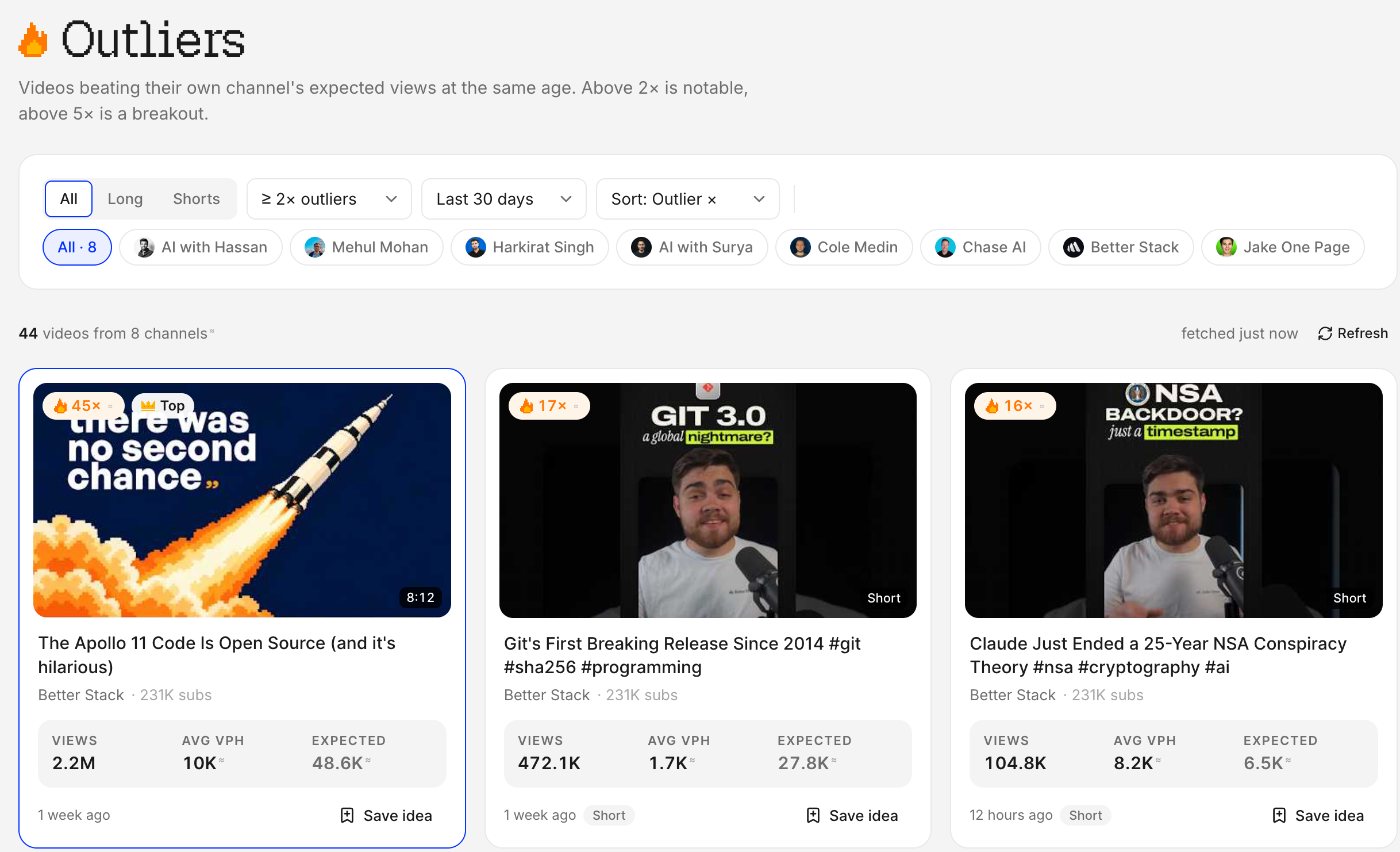
Then ask what made the difference: the topic, the format or the packaging. Each one gives you a different kind of idea. Our step-by-step guide to finding outlier videos on YouTube covers this in detail, and how to read an outlier score explains the maths.
2. What does YouTube search suggest?
Start typing in YouTube's search bar and it suggests completions. YouTube's help page on search says predictions are based on factors "like popularity or similarity", and, when you're signed in, on your own past searches and watched videos.
That last part matters. Use a private window, so the suggestions reflect other people's searches rather than yours.
Ways to get more out of it:
- Add a question word before your topic: how, why, what, can, best.
- Add a letter after it. "budget camera a", "budget camera b" and so on.
- Add who it's for: for beginners, for students, for small businesses.
- Add a comparison: "vs" after a product or tool name.
Suggestions tell you what people type. They don't tell you whether you can rank for it. That's the validation step at the end.
3. What are viewers asking in the comments?
Comments are free research. Look for:
- Questions you didn't answer. "How did you do X?" is a video.
- Disagreements. "This doesn't work for Y" is a follow-up video on Y.
- Requests. "Can you do one on Z?"
Do this on your own videos and on competitors' biggest recent videos. A question that shows up on several channels is a gap nobody has filled yet. If a video has too many comments to read, Vid0's comment insights reads up to 200 of the most relevant ones and sums up the questions, requests, praise and complaints, with video ideas that answer them. Everyone gets free tries every day.
4. What does your own analytics say?
YouTube Studio has three reports that are full of ideas.
The search terms people used to find you. YouTube's traffic sources page says you can see them on the "Traffic source: YouTube Search" card of the Reach tab. If people find a video through a term the video only touched on, that term may deserve its own video.
What your audience watches. YouTube's audience help page describes two reports on the Audience tab: "Channels that your audience watches", over the past 28 days, and "What your audience watches", which lists other videos, Shorts, live streams and podcasts your viewers watched outside your channel over the past seven days. Those are topics your viewers already chose.
Your own content report. Sort your videos by views, then by average view duration. The ones near the top of both are the topics your audience wants more of.
5. What broke out for your competitors recently?
This overlaps with outliers, but the focus is time. Look only at the last 30 days. A topic that broke out for two or three channels in the same month is a sign of current demand, not a one-off.
The Vid0 Chrome extension helps here. On any channel page it shows quick stats and that channel's top outliers from its last 50 uploads. Open the full channel panel and recent uploads are coloured by how they did, 2× or 5× or typical, so a competitor's latest breakout stands out in seconds. Tracking a channel puts its new outliers on your Vid0 board automatically.
Don't remake the video. Take the topic, the format or the angle, and make the version only you could make.
6. What's rising on Google Trends?
Google Trends shows how interest in a search term changes over time. It has had a YouTube Search filter since 2017, as TechCrunch reported at the time. Pick it from the search-type menu, which starts on Web Search.
Use it to:
- Spot seasonal topics early. If a term peaks every December, plan the video for November.
- Compare two phrasings of the same idea and use the more searched one in your title.
- Check whether a topic is growing or fading before you commit a week to it.
Remember how the numbers work. Google's Trends FAQ explains that scores are scaled from 0 to 100 relative to all searches in that place and time, and that a 0 doesn't mean nobody searched. They're relative interest, not search volume.
7. What are people asking on Reddit and forums?
Reddit, niche forums, Discord servers and Quora are full of people describing their problems in their own words. That's useful twice: it gives you the topic, and it gives you the exact phrasing for a title.
Search your niche's subreddits for "how do I", "is it worth" and "help". Sort by top posts of the past month. A long thread of people trying to solve one problem is a video that will get found.
8. What does YouTube Studio suggest?
YouTube Studio's own idea tools are changing, so here's where they stand.
Ask Studio. This is the tool YouTube now points creators to for brainstorming. Its Inspiration tab help page says: "Starting August 2026, we are gradually deprecating the Inspiration tab", and recommends Ask Studio in YouTube Studio for brainstorming content ideas instead. If you used Inspiration before, Ask Studio is the replacement.
The Research tab test. In August 2026, Tubefilter reported that YouTube was testing a new Research tab in Studio with "a small number of users". It shows other creators' videos with an outlier multiplier, plus a "Watched by my viewers" filter. A YouTube spokesperson told Tubefilter there was no information about a wider rollout, so most creators won't have it.
Treat Ask Studio's suggestions like any other idea and check them against the evidence below before you film. If you don't have the Research tab, the outlier method above gets you most of the way with public data.
9. Which of your own videos can you rework?
Your own past winners are the most overlooked source of ideas. They already proved your audience wants that topic from you.
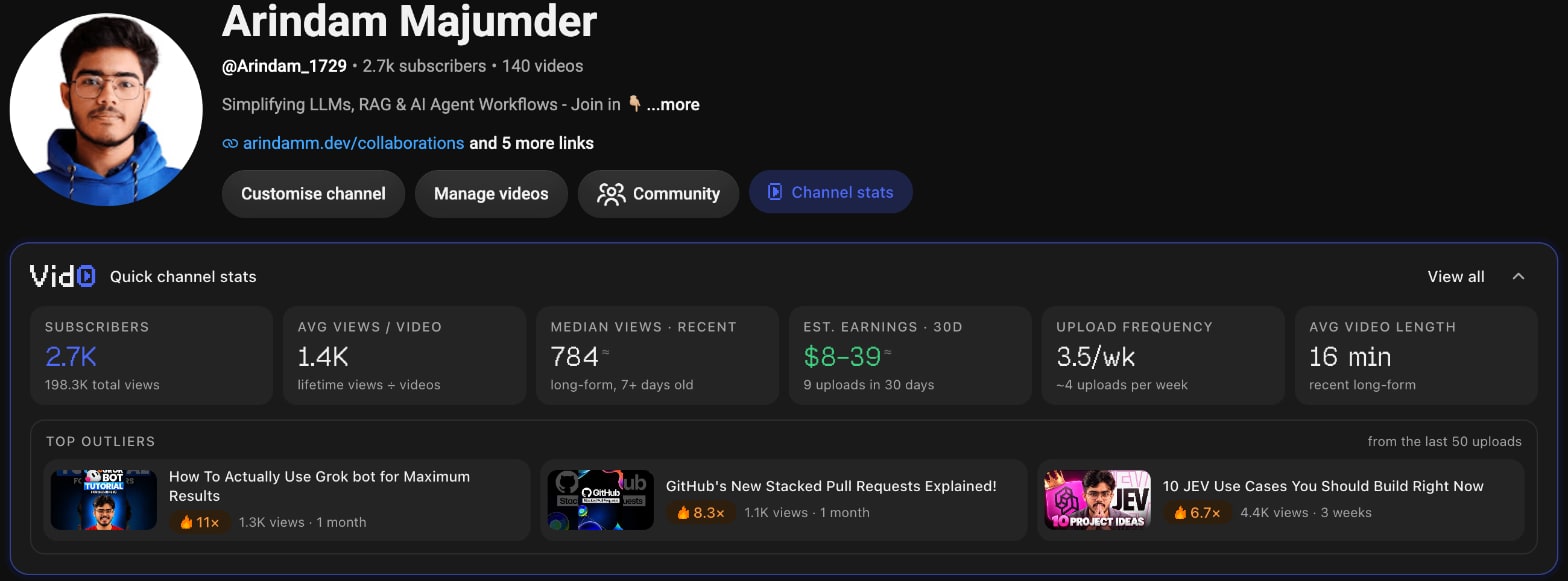
For each of your outliers, there are several next videos:
- A follow-up. Go deeper on the part people asked about in the comments.
- An update. If the topic has changed since you published, make the current version.
- A new format. A long tutorial can become a Short. A list can become one deep dive on its best item.
- A different audience. The same topic "for beginners" or "for teams".
Look at your underperformers too. A good topic with weak packaging might only need a new title and thumbnail, which you can test with YouTube's Test & Compare.
How do you validate a video idea before filming?
You now have more ideas than you can make. Before you script one, check two things.
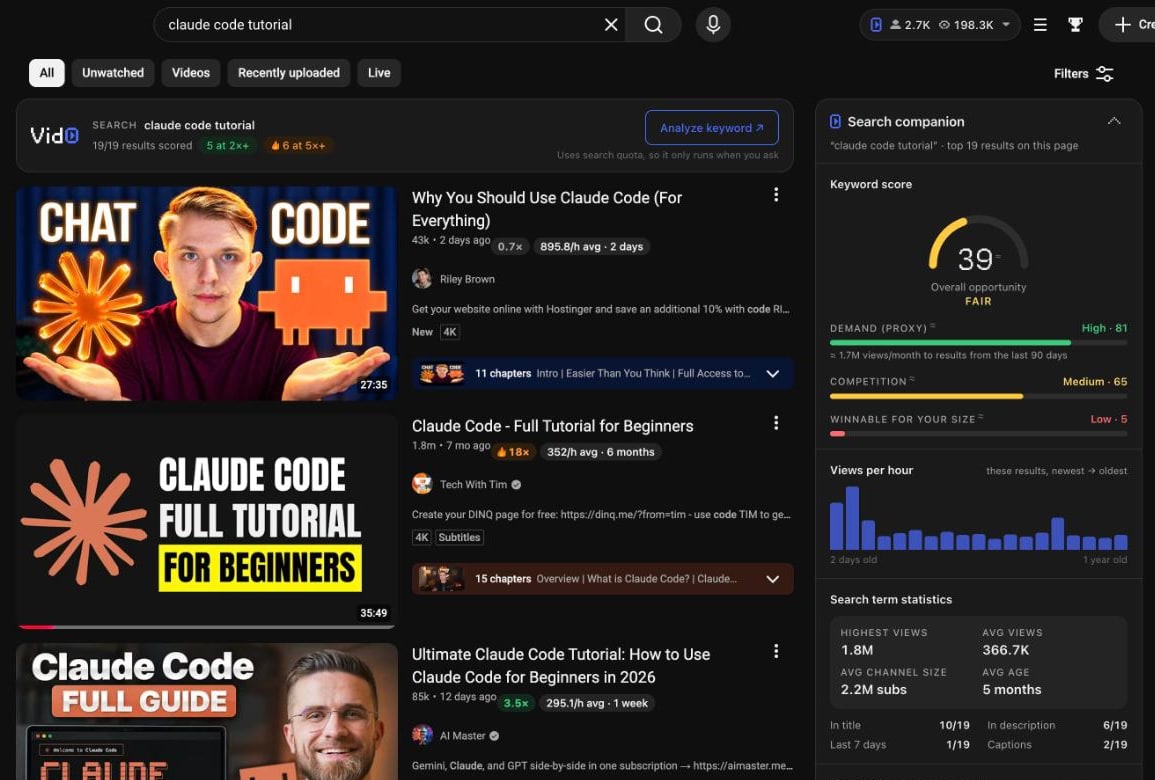
1. Is the keyword winnable at your size? Search the main keyword on YouTube and look at who ranks. If every top result is from a channel with a hundred times your subscribers, pick a narrower version. Vid0's Search companion shows a keyword score and whether the term is winnable for your size, right on YouTube's results page:
The method is in YouTube keyword research for small channels.
2. Is there outlier evidence? Look for at least one outlier on the topic, ideally from two or more different channels in recent months. One outlier could be luck or a famous guest. Several on the same topic is demand.
Then two quick checks:
- Can you say why yours is different? More current, more specific, easier to follow or for a different viewer. If you can't, keep looking.
- Does the title work? Write it before you film. The free YouTube title checker checks length and the hook as you type, the way YouTube shows them.
A worked example
Here's how the methods combine. The search numbers come from the screenshot above. The suggestions and comments are an illustration.
You run a small channel about AI coding tools. In the Search companion, "claude code tutorial" scores 39, and one of the top results is at 18× its channel's usual views (method 1: outlier evidence). Say YouTube search suggests longer versions of the phrase (method 2), and on the 18× video, several comments ask about a use case the video skipped (method 3).
That gives you a narrower idea: a tutorial on that one use case, titled in the words the commenters used. You check that narrower keyword in the Search companion. If channels your size show up and did well, you film it. If not, you narrow again.
Each step added evidence, and the final idea is smaller and more winnable than the one you started with.
Where does Vid0 fit?
Vid0 handles the outlier and keyword checks. The free video idea generator and outlier finder need no sign-up. Signed in, the Outliers page scores recent videos from the channels you track, and saved ideas keep the videos that inspired them. The free plan includes 3 tracked channels and 5 keyword lookups a day (pricing). Methods 2, 3, 4, 6, 7 and 8 need no tool at all.
What are the limits?
None of these methods guarantees views. Outliers show what worked, not what will work next month, and some can't be repeated: a news moment, a famous guest or a video shared widely off YouTube. Search suggestions and Google Trends show interest, not how hard a topic is to rank for. Treat each idea as a bet with some evidence behind it, and use your results to get better at choosing.
FAQ
What is the best way to find YouTube video ideas?
Find outliers in your niche: videos that got far more views than their channel usually does at the same age. They're evidence that an idea works with an audience. Then check the keyword is winnable at your size.
How do I find video ideas for a small YouTube channel?
Focus on outliers from channels close to your size, and on specific keywords where small channels already rank. Comments and your own search terms report are also strong sources, because they come from your actual viewers.
Is the YouTube Studio Inspiration tab still available?
YouTube is gradually deprecating it from August 2026, according to its help page, and recommends Ask Studio for brainstorming ideas instead. A separate Research tab was in a limited test in August 2026, with no wider rollout announced.
Can Google Trends show YouTube searches?
Yes. Google Trends has a YouTube Search filter in its search-type menu. Its scores are relative interest from 0 to 100, not search volume.
How do I know if a video idea is good before filming?
Check two things: that channels your size rank and do well for the keyword, and that the topic has produced outliers recently, ideally on more than one channel. Then make sure you can say why your version is different.
How many video ideas should I have ready?
Enough that you're never choosing under deadline. Keep a list, note the evidence for each idea, and pick from the ones with the strongest evidence each week.
Create your creator profile today
Your stats, rates and past collabs on one link, like vid0.in/@yourchannel. Share it with brands and get booked.
Keep reading
All posts →- GrowthResearch
How to get your first 1,000 YouTube subscribers
Ten steps for new channels. Learn from channels your size, package before you film, win the first 30 seconds and judge every upload against your usual.
8 min read
- GrowthResearch
How to grow your YouTube channel: a practical playbook
A growth playbook for small and mid-size channels: pick a viewer, find proven ideas, package and hold attention, then use Shorts, analytics and collabs.
11 min read
- ResearchOutliers
How to find outlier videos on YouTube (and copy the right thing)
A step-by-step way to find the videos that broke out in your niche, compare them fairly, and see whether the topic, format or packaging did it.
5 min read
Find your next outlier
Vid0 shows which videos broke out in your niche, why they did, and what you could make next.