How to see the tags on any YouTube video (free)
YouTube hides video tags, but every watch page carries them in its source. How to see them free, and why YouTube says they matter less than you think.

6 min read
Tags are the keywords a creator types into the "Tags" box when uploading. Viewers never see them, which is exactly why people want to look: they show which words a creator thought their video was about. Here's how to see them on any video, what they tell you and how much they actually matter.
What are YouTube tags?
Tags are a list of words and phrases attached to a video. The creator adds them in YouTube Studio, and they're optional. The YouTube Data API reference describes them as "a list of keyword tags associated with the video" and sets a limit of 500 characters for the whole list, with the commas between tags counting towards it.
Tags are different from hashtags. Hashtags like #japantravel go in the title or description, are visible and link to a results page. Tags are hidden.
How do I see the tags on a YouTube video for free?
Every YouTube watch page still sends its tags to your browser. You just have to look in the right place.
The quickest way is the free YouTube tag extractor: paste a video link and it lists the tags with YouTube's 500-character count. To do it by hand, use one of these three methods.
Method 1: view the page source
- Open the video on youtube.com in a desktop browser.
- Press Ctrl+U (Windows, Linux) or Cmd+Option+U (Mac). Or type
view-source:in front of the video's URL. - Press Ctrl+F (or Cmd+F) and search for
name="keywords".
You'll find a line like this, with the tags separated by commas:
<meta name="keywords" content="Japan, Japan travel, travel, yt:cc=on, Japan vlog, ...">We checked this on 18 October 2026 with the video in the screenshots below, "Day Trip to Mt. Fuji Area from Tokyo" by Unique Japan Travel. The page source listed all 20 of its tags.
The same list appears a second time, further down, inside a block of data called ytInitialPlayerResponse. Search for "keywords":[ to find it. That version puts each tag in its own quotes, so you can see exactly where one tag ends and the next begins.
Method 2: ask the browser console
If you're comfortable with developer tools, this gives you a clean list:
- Open the video and reload the page (this matters, see below).
- Press F12 (or Cmd+Option+J on a Mac) and open the Console tab.
- Type
ytInitialPlayerResponse.videoDetails.keywordsand press Enter.
Method 3: your own videos in YouTube Studio
For your own uploads, open YouTube Studio, go to Content, click a video and press Show more in the details page. The Tags box is there, and you can edit it.
If none of these methods shows any tags, the video most likely has none. Many creators skip them.
How much do tags matter on YouTube?
Less than most people think, and YouTube says so directly. Its help page, Add tags to your YouTube videos, says the title, thumbnail and description "are more important pieces of metadata for your video's discovery", and that tags "play a minimal role". The one case where it says tags help is when your topic is "commonly misspelled".
So don't expect tags to rank a video. A clear title and a description that says what the video is about do far more. If you're working on those, start with how to write YouTube titles that get clicked.
So why look at other creators' tags at all?
Because they're a cheap window into how a creator thinks about their topic. Looking at the tags on a video that did well can show you:
- Spellings and variants. "Mt. Fuji", "Mount Fuji" and "Fujisan" are all on the video below. That's the misspelling case YouTube describes.
- Other languages. The same video has tags in Japanese (富士山, 山中湖). That's a hint the creator expects viewers searching in Japanese, not just English.
- Related places and subtopics. Oshino Hakkai, Yamanakako and Yamanashi tell you what else the video covers, which you can use as ideas.
What tags won't tell you is why a video did well. A breakout usually comes from the topic, the format or the title and thumbnail. If you're studying a video because it beat its channel's usual views, how to find outlier videos on YouTube walks through the right questions to ask.
The fastest way: see tags next to the video with Vid0
The free methods work, but they mean digging through a page of code for every video. The Vid0 Chrome extension adds a scorecard next to every YouTube video, and its SEO tab shows the tags as a list you can read at a glance:
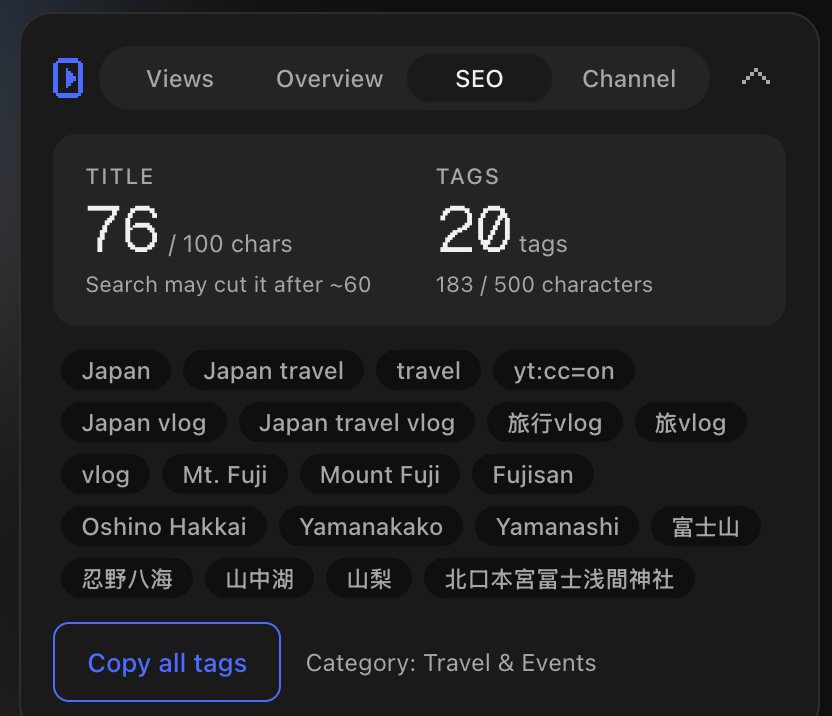
What you see in the SEO tab:
- Title length: 76 of YouTube's 100 characters, with a note that search may cut it after about 60.
- Tag count and characters: 20 tags using 183 of the 500 allowed. Vid0 counts the way Studio does: commas count, and a tag with a space gets two extra characters for the quotes YouTube wraps around it.
- Every tag, in the creator's order, including ones that aren't search phrases at all, like
yt:cc=on. - Copy all tags, which copies the list separated by commas.
- The category the creator picked, here Travel & Events.
It reads the tags from the same ytInitialPlayerResponse data you'd find in the page source, on your own device, so it's no more "secret" than Method 1. It just saves you the digging. The extension is free on every Vid0 plan; add it from the Chrome Web Store or see the extension page for what else it shows.
Tags are a small part of a video's search setup. The description does more, so use the YouTube description template next, and see how to grow your YouTube channel for where search fits in the bigger picture.
FAQ
Can you see the tags on someone else's YouTube video?
Yes. Tags aren't shown on the page, but they're in the page source. Press Ctrl+U (Cmd+Option+U on a Mac) on the watch page and search for name="keywords".
Do YouTube tags help with ranking?
Only a little. YouTube's help page says tags play a minimal role in discovery and that the title, thumbnail and description matter more. Tags are most useful for words that are often misspelled.
How many tags can a YouTube video have?
There's no set number of tags, but the whole list is limited to 500 characters. Commas between tags count, and so do the quotes added around tags that contain spaces.
Why can't I find any tags on a video?
Most likely the creator didn't add any. Tags are optional. If you're using the browser console, reload the page first, because YouTube can keep the previous video's data after you click to a new one.
Are tags the same as hashtags?
No. Hashtags go in the title or description, are visible to viewers and link to a page of videos with the same hashtag. Tags are hidden and only seen by YouTube (and anyone who looks at the page source).
Create your creator profile today
Your stats, rates and past collabs on one link, like vid0.in/@yourchannel. Share it with brands and get booked.
Keep reading
All posts →- ExtensionComparisons
Best Chrome extensions for YouTube creators (2026)
Eleven Chrome extensions for YouTube creators, for analytics, keywords, thumbnails, transcripts and focus, with store user counts and which work without an account.
9 min read
- ExtensionProduct
The Vid0 Chrome extension is live: free YouTube analytics on every page
Vid0's free Chrome extension is live. Outlier scores, views per hour, keyword odds, tags and channel stats on YouTube, plus a YouTube Studio assistant.
11 min read
- ResearchKeywords
YouTube keyword research for small channels: find topics you can win
Why search volume misleads small channels, how to check who actually ranks for a keyword, and how Vid0 scores whether a topic is winnable at your size.
5 min read
Find your next outlier
Vid0 shows which videos broke out in your niche, why they did, and what you could make next.