YouTube description template (with a scoring checklist)
A copyable YouTube description template, what each part is for, and the six-part checklist Vid0 uses to score descriptions out of 100.

6 min read
Most descriptions are either empty or a wall of links. Neither helps a viewer decide to watch, and neither tells YouTube much about the video. Here's a template you can paste into YouTube Studio, what each part is for and how to check the result.
The YouTube description template
Copy this, replace everything in [brackets] and delete the parts you don't need.
[One or two sentences that say what this video is, using the main words
from your title. This is the part people see first.]

[Two to four sentences on what viewers will learn, see or get. Write it
for a person. Mention the topic again in your own words.]

In this video:
- [Point or step 1]
- [Point or step 2]
- [Point or step 3]

Chapters
0:00 [Intro]
0:45 [First section]
3:10 [Second section]
6:30 [Third section]

Watch next: [Title of a related video] [link]
Full playlist: [link]

Mentioned in this video:
- [Tool, source or product]: [link]

[A question for the comments, e.g. "Which one would you try first?"]

[One or two sentences about your channel and when you post.]
[Where else to follow you]: [link]

#[hashtag1] #[hashtag2] #[hashtag3]
What should go in each part of a YouTube description?
1. The opening lines: say what the video is
YouTube's Tips for video descriptions puts it plainly: use the first few lines to describe your video, "because it's what viewers will see first". It also suggests picking "1-2 main words that describe your video" and featuring them in both the title and the description.
So don't open with "Subscribe!", a link or a row of hashtags. Name the topic. Vid0 checks the first 150 characters for this, because that's roughly how much shows before the description is cut off.
2. The summary and "In this video"
A few sentences and a short list give YouTube and viewers more to go on. This is where the topic's other words fit naturally: the places, tools, steps or names the video covers. Write it like you'd explain the video to a friend. A list of keywords helps nobody.
3. Chapters
Chapters split the video into sections on the progress bar, and they're a quick table of contents in the description. YouTube's Video Chapters help page sets three rules for adding them by hand:
- The first timestamp must be 0:00 (the page writes it as 00:00).
- There must be at least three timestamps, in ascending order.
- Each chapter must be at least 10 seconds long.
Break any of these and YouTube won't show chapters at all. Shorts don't use them.
4. Links
Link to the next video you want people to watch, a playlist, and anything you mentioned. YouTube's tips page suggests linking out to playlists of related videos. For Shorts, skip them: YouTube's Sharing links with your audiences page says URLs in Shorts descriptions "are non-clickable", to reduce spam and scams.
5. A question and a little about you
A specific question gives viewers an easy reason to comment. A line about your channel and how often you post tells new viewers why they should subscribe.
6. Hashtags: three is the number
YouTube's hashtags help page says "up to three hashtags that are considered most engaging will appear by your video title". The rest stay in the description. It also says that if a video has more than 60 hashtags, YouTube will "ignore each hashtag on that content". Pick the three that describe the video best.
How do I score my YouTube description?
Here's the checklist the Vid0 Chrome extension uses in YouTube Studio. It scores the description out of 100 as you type, on your device:
| Part | Points | Full points when | Partial points |
|---|---|---|---|
| Opening | 25 | A title keyword is in the first 150 characters | 12 if the opening is 80+ characters but misses the keywords, 5 if shorter |
| Keywords | 25 | All of the title's keywords appear somewhere | 25 × the share used, rounded |
| Length | 20 | 200 words or more | 14 for 100 to 199, 8 for 40 to 99, 3 for 1 to 39 |
| Chapters | 15 | Working chapters (0:00 first, 3+ timestamps, 10+ seconds apart) | 0 otherwise. Shorts get 15 |
| Links | 8 | At least one link | 0 otherwise. Shorts get 8 |
| Hashtags | 7 | 1 to 3 hashtags | 3 for none, 2 for 4 or more |
Scroll sideways to see every column.
To check a draft without installing anything, paste it into the free YouTube title and description checker.
"Title keywords" are the first five meaningful words in the title, skipping filler like "the", "how" and "video". The thresholds, like 200 words, are Vid0's rules of thumb, not YouTube rules. It's a packaging check, not a ranking prediction.
A worked example
Here's the score for a real video, "10 JEV Use Cases You Should Build Right Now":
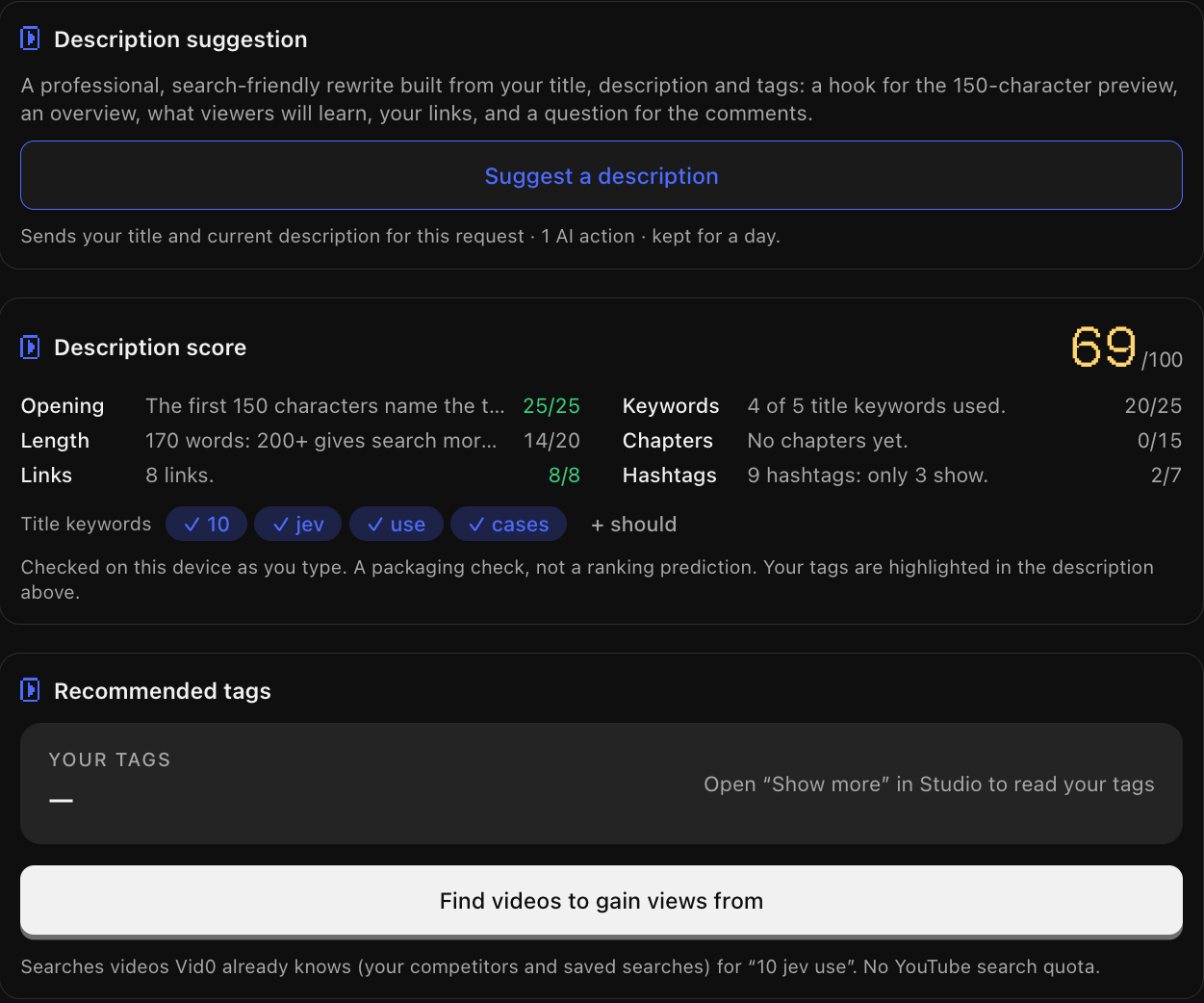
- Opening, 25/25. The first 150 characters name the topic.
- Length, 14/20. 170 words. 30 more would get the full 20.
- Links, 8/8. 8 links.
- Keywords, 20/25. The title keywords are 10, jev, use, cases and should. Four of five are used: 25 × 4/5 = 20.
- Chapters, 0/15. No chapters yet.
- Hashtags, 2/7. 9 hashtags, and only 3 will show.
Adding chapters (+15), cutting to three hashtags (+5) and writing 30 more words (+6) takes it from 69 to 95. The last 5 points are for "should", which Vid0 counts as a keyword because it isn't on its filler list. Don't force a word like that in. A 95 with natural writing beats a 100 that reads oddly.
The same problems show up in Vid0's SEO checklist, with the exact fix:
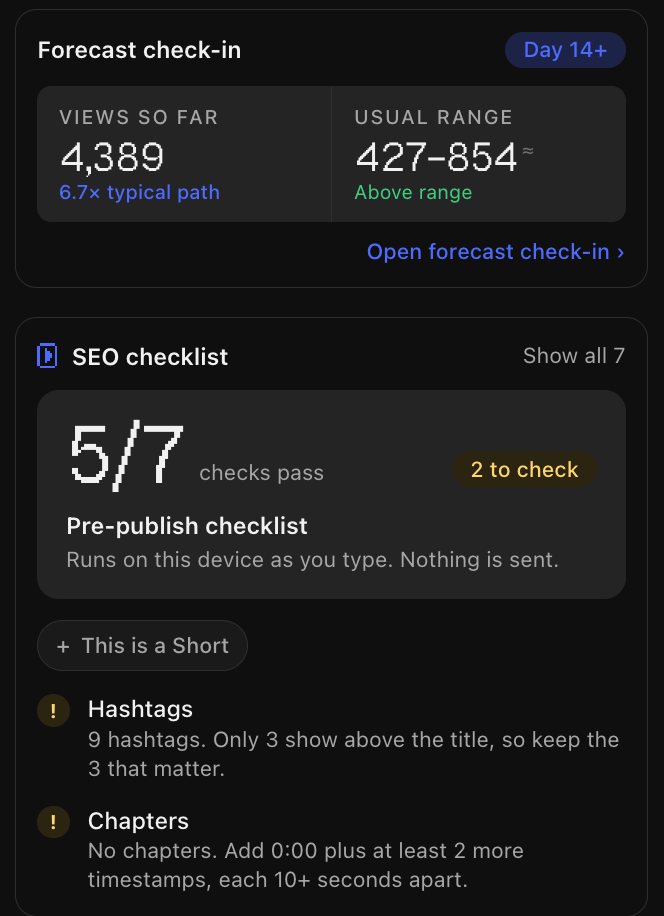
If you'd rather start from a draft, the Suggest a description button writes one from your title, current description and tags: a hook for the preview, an overview, what viewers will learn, your links and a question for the comments. It keeps your own links and chapters, and uses one AI action. The Free plan includes 10 a month (see pricing).
The description is only half the packaging. The title does most of the work in search and feeds, so check it with the 6-point YouTube title checklist too. Tags count for less than either, but if you want to see which ones other creators use, here's how to see the tags on any YouTube video.
FAQ
How long should a YouTube description be?
Long enough to say what the video is, summarise it and add chapters and links. Vid0 gives full points from 200 words. YouTube's limit is 5,000 bytes.
What should the first line of a YouTube description say?
What the video is, using the main words from your title. YouTube says the first few lines are what viewers see first.
How do I add chapters to a YouTube video?
List timestamps in the description, one per line, starting with 0:00. You need at least three, in ascending order, and each chapter must be at least 10 seconds long.
How many hashtags should I put in a YouTube description?
Up to three. YouTube shows up to three by the title, and ignores every hashtag on a video that has more than 60.
Should I put links in a YouTube Shorts description?
No. Links in Shorts descriptions aren't clickable, so they don't help viewers. Vid0's score doesn't count them against a Short.
Does a better description help my video rank?
It helps YouTube and viewers understand the video, and YouTube says keywords in descriptions can help people find videos through search. A high score isn't a promise of more views, though. The title and thumbnail are what decide whether people click.
Create your creator profile today
Your stats, rates and past collabs on one link, like vid0.in/@yourchannel. Share it with brands and get booked.
Keep reading
All posts →- KeywordsResearch
How to see the tags on any YouTube video (free)
YouTube hides video tags, but every watch page carries them in its source. How to see them free, and why YouTube says they matter less than you think.
6 min read
- ExtensionComparisons
Best Chrome extensions for YouTube creators (2026)
Eleven Chrome extensions for YouTube creators, for analytics, keywords, thumbnails, transcripts and focus, with store user counts and which work without an account.
9 min read
- PackagingThumbnails
YouTube thumbnail mistakes that kill your CTR
Eight common YouTube thumbnail mistakes, what to do instead, YouTube's current thumbnail specs and how to check a design before you publish.
8 min read
Find your next outlier
Vid0 shows which videos broke out in your niche, why they did, and what you could make next.