How much does YouTube pay per 1,000 views?
YouTube pays a share of ad revenue, not a rate per view. RPM vs CPM, the 55% and 45% shares, Shorts vs long-form and worked examples.

10 min read
"How much does YouTube pay per 1,000 views?" has no single answer, and any page that gives you one number is guessing. Two channels with the same views can earn very different amounts. This post explains how the money actually flows, what moves your rate, and how to work out your own number.
Does YouTube pay per view?
No. YouTube pays you a share of the money advertisers spend on your videos, plus a share of other revenue such as YouTube Premium. A view with no ad earns nothing from ads. So "per 1,000 views" is a way of describing the result after the fact, not a price YouTube sets.
You also need to be in the YouTube Partner Program first. According to YouTube's Partner Program eligibility page, ad revenue sharing needs 1,000 subscribers plus either 4,000 qualified watch hours in the last 12 months or 10 million qualified Shorts views in the last 90 days.
What's the difference between RPM and CPM?
These two get mixed up all the time. YouTube's ad revenue analytics page defines both:
| RPM | CPM | |
|---|---|---|
| Stands for | Revenue per mille (1,000) | Cost per mille (1,000) |
| Measures | What you earned per 1,000 video views | What advertisers spend per 1,000 ad impressions |
| YouTube's share | Already taken out | Not taken out |
| Which views count | All views, including ones with no ads | Only views where an ad ran |
Scroll sideways to see every column.
YouTube's page says RPM is calculated after YouTube's revenue share and "includes all views, including ones that weren't monetized". That's why your RPM is always lower than your CPM. When someone quotes a CPM, it is not what the creator takes home.
How much does YouTube keep?
YouTube's partner earnings overview sets out the shares:
- Long-form ads on the watch page: you get 55% of net revenue.
- Shorts Feed ads: you get 45% of the revenue allocated to you from the Shorts Creator Pool.
- Memberships, Super Chat, Super Stickers and Super Thanks: you get 70% of net revenue.
The long-form share is simple: ads run on your video, and you get 55% of what they earn. Shorts work differently.
How do Shorts earnings work?
Shorts ads play between videos in the Shorts Feed, not on one creator's video. So YouTube pools the money. Its Shorts monetization policies describe the steps:
- Each month, revenue from ads between Shorts in the feed is added together.
- Some of it pays for music licensing when Shorts use music. What's left is the Creator Pool.
- The pool is split by each creator's share of engaged views from monetizing creators in each country.
- You keep 45% of what's allocated to you, whether or not you used music.
YouTube's own example: a country earns $100,000 from Shorts Feed ads, $10,000 covers music, and the pool is $90,000. A creator with 1 million of the 100 million engaged views (1%) is allocated $900 and keeps $405. That works out to $0.405 per 1,000 engaged views, but the numbers in YouTube's example are hypothetical, not real rates.
The same page says that from 1 February 2027, you'll need at least 10 million qualified Shorts views in the last 90 days to earn Shorts ad and Premium revenue for a month.
Why does RPM vary so much between channels?
YouTube's ad revenue page names the main reasons rates move:
- Where your viewers are. Ad competition differs by country. YouTube says different locations "will have different levels of competition in the ad market". Our post on how much Indian YouTubers earn per 1,000 views has one dated example of the gap between Indian and US viewers.
- Your niche. YouTube doesn't publish rates by topic, but your topic decides who watches and which advertisers want to reach them. A video that draws buyers with money to spend attracts more bidders.
- Time of year. Advertisers bid more in some seasons, and YouTube notes many bid higher just before holidays.
- Ad formats. Different ad types carry different CPMs. YouTube's suggestions for raising RPM include turning on monetization for all videos and turning on mid-roll ads.
- Unmonetized views. RPM counts every view. If more of your views carry no ads, your RPM falls even when revenue doesn't.
- Revenue mix. RPM includes memberships, Premium and Supers as well as ads. A channel with strong memberships can have a higher RPM than its ads alone would give.
This is why a finance channel with a US audience and a gaming channel with a global audience can have very different RPMs at the same view count.
How much do Shorts pay compared with long-form?
Much less per view. Vid0's Chrome extension uses these rough ranges to estimate earnings:
| Format | Vid0's rough RPM range |
|---|---|
| Long-form | $1 to $5 per 1,000 views |
| Shorts | $0.03 to $0.08 per 1,000 views |
These are a rough Vid0 estimate, not YouTube data. They're deliberately wide, in US dollars and generic: they don't know a channel's niche, audience country or eligibility. On these ranges, a long-form view is worth roughly 30 to 60 times a Shorts view.
That doesn't make Shorts pointless. They can bring in viewers who go on to watch your long-form videos, and they count towards Partner Program eligibility through the Shorts views route. They just aren't a strong ad revenue source on their own.
Worked examples: what do different view counts earn?
The arithmetic is views ÷ 1,000 × RPM. Using Vid0's rough ranges:
| Views | Format | Low ($1 or $0.03) | High ($5 or $0.08) |
|---|---|---|---|
| 10,000 | Long-form | $10 | $50 |
| 100,000 | Long-form | $100 | $500 |
| 1,000,000 | Long-form | $1,000 | $5,000 |
| 1,000,000 | Shorts | $30 | $80 |
| 10,000,000 | Shorts | $300 | $800 |
Scroll sideways to see every column.
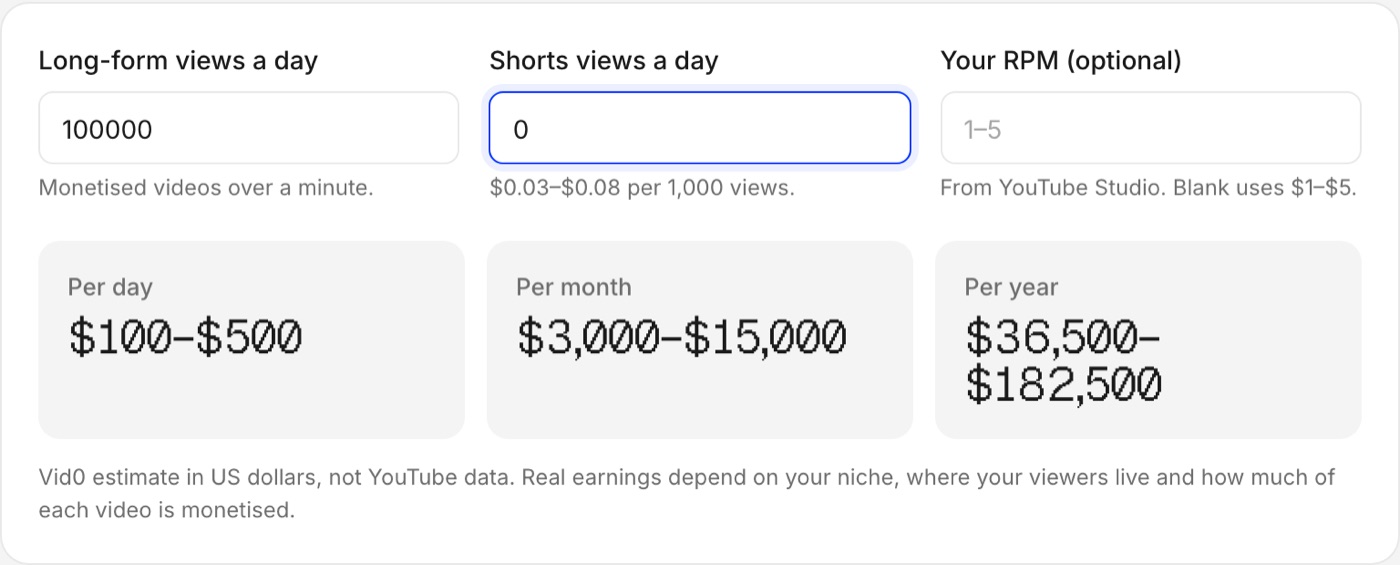
For 100,000 long-form views: 100 × $1 = $100, and 100 × $5 = $500.
A mixed month. Say a monetized channel gets 50,000 long-form views and 500,000 Shorts views in a month:
- Long-form: 50 × $1 to 50 × $5 = $50 to $250
- Shorts: 500 × $0.03 to 500 × $0.08 = $15 to $40
- Total: $65 to $290
Note that this channel's 500,000 Shorts views a month add up to 1.5 million over 90 days. That's below the 10 million YouTube will require for Shorts ad revenue from February 2027, so the Shorts line could drop to zero.
Working backwards. How many long-form views make $1,000 a month? Divide $1,000 by your RPM and multiply by 1,000. At $1, that's 1,000,000 views. At $5, it's 200,000. The gap between those two answers is why your own RPM matters more than any average.
The YouTube earnings calculator does this arithmetic for you, for long-form and Shorts, and lets you swap in your own RPM.
Where do you find your real RPM in YouTube Studio?
If you're in the Partner Program, YouTube shows you your actual RPM. YouTube's guide to checking your revenue gives the path:
- Sign in to YouTube Studio.
- In the left menu, select Analytics.
- From the top menu, select Revenue.
The Content performance report on that tab includes your RPM and shows which videos, Shorts and live streams earned the most. Look at long-form and Shorts separately, because a blended RPM hides how different they are.
Two things to know. First, these are estimates: YouTube adjusts them about a week later and again in the middle of the following month, and finalized earnings appear in AdSense for YouTube. Second, use at least 90 days. A single month can swing with the ad season.
Did the August 2026 view-count change affect RPM?
Possibly, and it's worth knowing about. From 24 August 2026, YouTube counts a public view from the first frame of playback on long-form videos and live streams too, as reported by PPC Land, quoting TeamYouTube's announcement. Shorts already counted views this way. The report says Partner Program earnings and eligibility don't change.
We haven't found YouTube saying how this affects RPM. If more short plays now count as views while revenue stays the same, RPM per 1,000 views would read lower. Treat that as something to check in your own Studio, not a fact, and be careful comparing RPM from before and after that date.
How do you estimate another channel's earnings?
You can't see another channel's RPM, so any estimate is a range. The Vid0 Chrome extension shows an "est. earnings · 30d" tile on every channel page. It takes views on videos uploaded in the last 30 days and applies the same rough ranges as above.
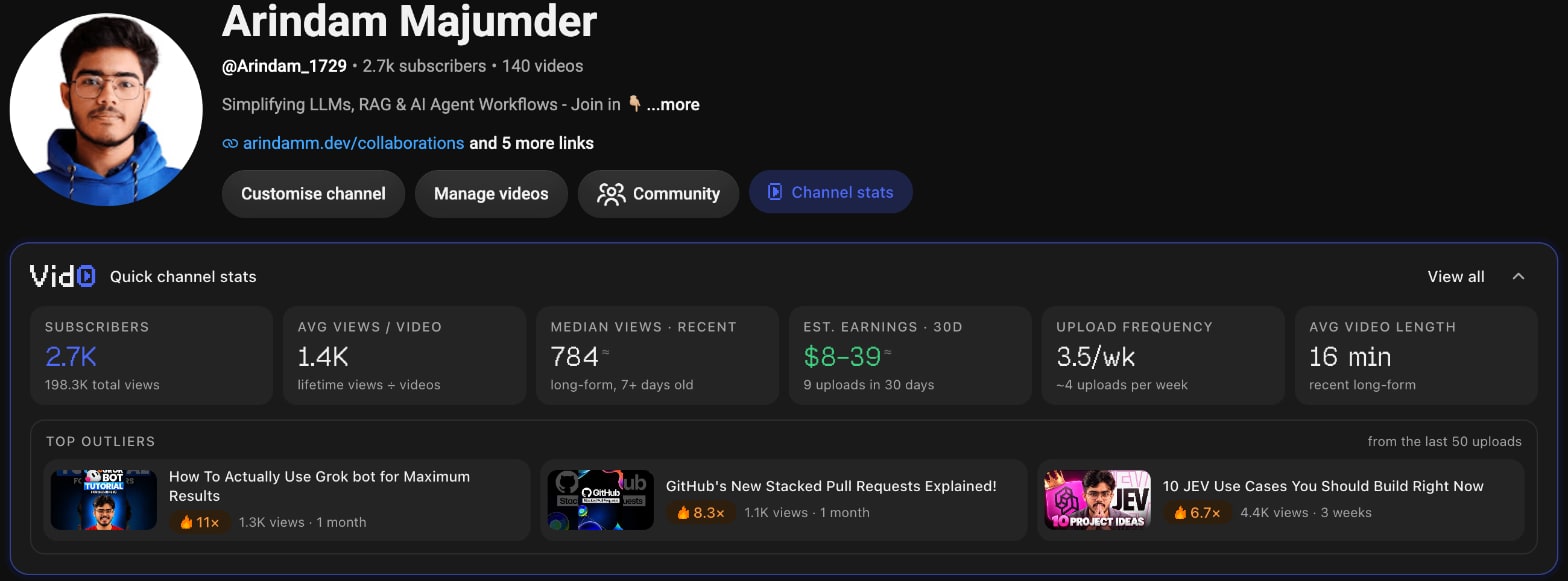
The tile doesn't know whether a channel is monetized, where its viewers are or which niche it's in. Use it to compare channels roughly, not to predict a payout. Our guide to checking any YouTube channel's stats and earnings covers the method in more detail, and the Vid0 extension page shows the rest of what it adds to YouTube.
Is ad revenue the main way YouTubers earn?
For many channels, no. Ads pay per view at a rate you don't control. Other income doesn't depend on RPM:
- Brand deals. Sponsors pay per video, priced from your typical views and niche. The sponsorship rate calculator gives a starting range.
- Memberships and Supers. You keep 70% of net revenue.
- YouTube Premium. Premium subscribers' fees are shared with the channels they watch, and that revenue is included in RPM.
Here's the gap at small scale. Take the channel in the screenshot above, with 784 median views. Ads on one typical video, at $1 to $5 RPM, come to about $0.78 to $3.92. One sponsored integration on the same 784 views, at the $30 to $60 CPM band Vid0's calculator uses for tech, comes to about $24 to $47. Both are rough Vid0 estimates, but the difference is the point.
What are the limits of these numbers?
Every figure in this post that isn't from your own Studio is an estimate. Vid0's RPM ranges are generic and wide on purpose. YouTube's Shorts example uses made-up numbers to show the method. Your real RPM depends on your audience, topic, season and format mix, and it changes month to month. Use the ranges to sense-check, and your Studio Revenue tab for decisions.
FAQ
How much does YouTube pay for 1,000 views?
There's no fixed rate. You earn your RPM, which is revenue per 1,000 views after YouTube's share. Vid0's rough estimate is $1 to $5 per 1,000 long-form views and $0.03 to $0.08 per 1,000 Shorts views. Check your real RPM in YouTube Studio under Analytics, then Revenue.
How much does YouTube pay for 1 million views?
On Vid0's rough ranges, about $1,000 to $5,000 for 1 million long-form views and $30 to $80 for 1 million Shorts views. Your own RPM can sit outside those ranges.
What percentage of ad revenue does YouTube give creators?
55% of net ad revenue on long-form videos on the watch page, and 45% of the revenue allocated to you from the Shorts Creator Pool. For memberships, Super Chat, Super Stickers and Super Thanks, you get 70%.
Why is my RPM lower than my CPM?
RPM is after YouTube's revenue share and counts every view, including ones with no ads. CPM is what advertisers spend per 1,000 ad impressions, before YouTube's share.
Do you get paid for views before joining the Partner Program?
No. Ad revenue sharing starts once you're in the YouTube Partner Program, which needs 1,000 subscribers plus 4,000 watch hours in 12 months or 10 million Shorts views in 90 days.
Why do Shorts pay so much less than long-form?
Shorts ads run between videos in the feed, and the money is pooled and split across all monetizing creators by engaged views, with part going to music licensing. Vid0's rough estimate puts a Shorts view at a small fraction of a long-form view.
Create your creator profile today
Your stats, rates and past collabs on one link, like vid0.in/@yourchannel. Share it with brands and get booked.
Keep reading
All posts →- For brandsPricing
YouTube influencer marketing cost in 2026: how to budget
How brands can estimate what a YouTube creator should cost: pricing models, a views-based formula, a worked launch budget and what moves the price.
7 min read
- IndiaAnalytics
How much do Indian YouTubers earn per 1,000 views?
RPM vs CPM, why Indian audiences usually pay less per view, how Shorts revenue sharing works, and how to find your real rate in YouTube Studio.
7 min read
- ResearchAnalytics
How to check any YouTube channel's stats and earnings
Which YouTube channel stats are public, how to check them free, and how earnings estimates work, with a worked example and why they can be far off.
7 min read
Find your next outlier
Vid0 shows which videos broke out in your niche, why they did, and what you could make next.